Overview
Scene3D Designer
Visual 3D designer on route #/scene3d_designer. It lets you compose a
three-dimensional scene (three.js), bind its objects to the app's scaffolded
routes and publish it read-only through the Scene3D Viewer (#/scene3d_viewer/:scene_key).
Scope
- Authoring of 3D scenes with primitives, imported assets and data-driven components.
- PBR materials, custom shaders, lights, shadows and — optionally — path tracing.
- Selectable renderer: WebGL (default) or WebGPU (opt-in), with automatic fallback.
- Binding of each object to a WUIC route (with an optional record) to drive visual
properties from data and open the route's CRUD with a double click.
- Scene persistence on
_wuic_scene3d(scene_json) and read-only runtime
reopening in the viewer.
Palette
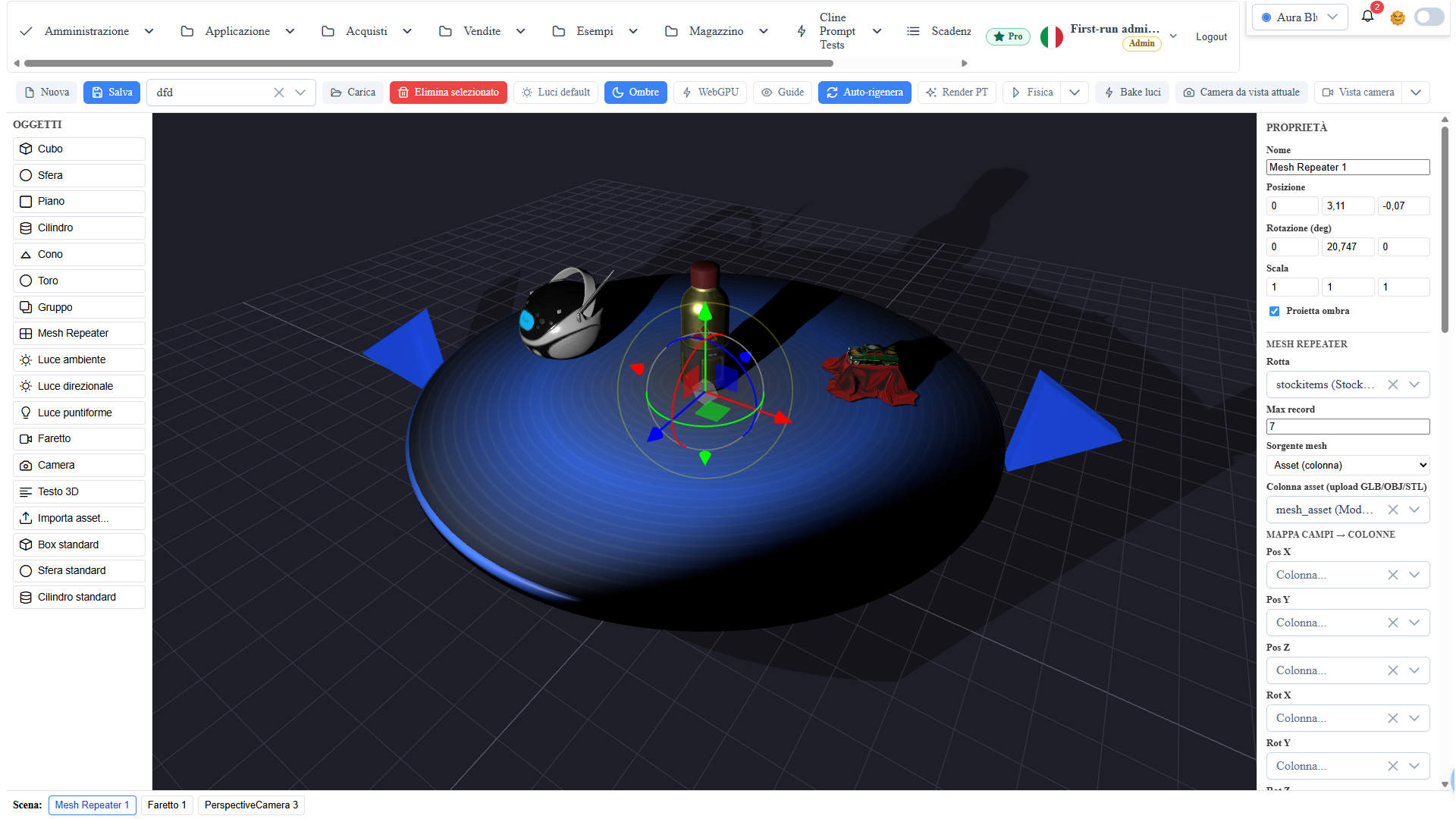
"Objects" panel (left): drag/click an entry to add the object to the center of
the scene. Each object is a THREE.Object3D with serializable geometry and
material. Viewport helpers (grid, gizmo, lights) are marked
userData.wuicTransient and are never persisted.
- Primitives: cube, sphere, plane, cylinder, cone, torus.
- Group: container to group and transform multiple objects together.
- Lights: ambient, directional, point, spot.
- Camera: an authorable point of view, used by the viewer and the preview.
- 3D Text: extruded text.
- Mesh Repeater: grid/ring/carousel of instances generated from data (DATAREPEATER 3D).
- Import asset: external model (glTF/GLB, OBJ, FBX, STL, DAE).
The palette is metadata-extensible: custom types defined in the
scene3d_object_type route appear automatically alongside the built-in types.
Import asset
Beyond the palette primitives, the designer imports external models through
three.js asset loaders. Supported formats:
- glTF / GLB (
.gltf,.glb) — recommended transport format (PBR, animations). - OBJ (
.obj) — geometry + optional materials (.mtl). - FBX (
.fbx) — meshes, hierarchies and animations. - STL (
.stl) — solid mesh (typical CAD / 3D printing). - DAE / COLLADA (
.dae) — scenes with hierarchy and materials.
The imported asset is embedded in the scene's content group and serialized with
the rest of the payload, so the scene stays self-contained in the viewer.
Property panel
"Properties" panel (right), active on the selected object:
- Name, Position (x/y/z), Rotation (degrees), Scale, Color.
- Material (PBR): metalness, roughness, emissive, opacity, wireframe, flat
shading, faces (front/back/double). For the physical material also
transmission, IOR, thickness and volumetric absorption (colored glass).
- Gizmo: on selection the object shows both the translation handles
(arrows) and the rotation handles (rings). Shortcuts: g = move, r = rotate,
s = scale.
Shader effects
Each mesh can receive a shader effect in addition to the standard material:
- JSON effect (with schema): a small JSON describes the effect (base uv/tint/normal,
pulse, light, displacement, opacity) and is compiled for the active renderer —
GLSL on WebGL, node-material on WebGPU. It is edited with a JSON editor featuring
autocompletion and validation, with an alternate "structured" view.
- Custom GLSL shader: hand-written vertex/fragment shaders (animated
uTime
uniform). Available only with the WebGL renderer.
WebGL / WebGPU renderer
- WebGL (default): classic three.js rendering, maximum compatibility.
- WebGPU (opt-in from the toolbar): node-materials renderer, active if the
browser supports it; otherwise it automatically stays on WebGL. The chosen
mode is saved with the scene and restored on opening.
- Some features remain WebGL-only and are flagged when the WebGPU renderer is
active: custom GLSL shaders (replaced by a fallback material and restored when
going back to WebGL) and path tracing.
- Designer and viewer are loaded lazy (
import(...)): three.js stays
code-split and does not enter the initial bundle nor the library barrel.
Lighting
- Scene lights: directional, point, spot and ambient, with soft shadows.
- Light bake (per-vertex): bakes static lighting into vertex colors and
switches to an unlit material — "fixed" light independent of runtime lights.
With the WebGPU renderer the bake runs on a compute shader (shadows included),
much faster on dense scenes.
- Path tracing (WebGL renderer): progressive photorealistic preview mode with
global illumination, soft shadows and colored shadows through transmission
materials.
Animations and physics
- Animations / timeline: clips from imported assets (glTF/GLB) have a
transport (play/pause/stop/scrubber) in the designer and autoplay in the viewer.
- Physics (optional): per-object authoring (static/dynamic/kinematic,
collision shape, mass, friction, restitution) with Play/Stop simulation in the
designer and optional autoplay in the viewer.
Camera and preview
- Authored camera: positioned like any object; the viewer can open from its
point of view (#/scene3d_viewer/:scene_key/:camera_id).
- Camera preview: real-time popup with the selected camera's view, useful for
framing before publishing.
Route binding + click → CRUD
"Route binding" section of the property panel:
- Route: the WUIC metadata route the object is bound to (e.g.
prodotti). - Record ID (optional): binding to a specific record; empty = route binding.
- Field map: associates visual properties (label, color, visibility) with the
route's columns, so the viewer applies real data to the objects.
- Double click on a bound object in the viewer opens the route's CRUD
(edit/detail parametric-dialog of the linked record).
Mesh Repeater
The Mesh Repeater (DATAREPEATER 3D) is a palette object that, instead of
representing a single mesh, generates N instances from a route's data: one
mesh per record, arranged according to a layout archetype (carousel on a disc
with navigation arrows, grid, ring). It is the 3D equivalent of a
list-grid: the instances are rebuilt from data and are not serialized in the
scene JSON — the viewer regenerates them on load. The repeater moves/rotates like
a group with the gizmos; the Regenerate button (or the Auto-regenerate
toggle) re-runs the fetch and rebuilds the meshes.
Data source and mapping
- Route + Max records: the WUIC route that feeds the repeater and how many
records to load (first page).
- Mesh source: how each instance's mesh is obtained —
- Fixed: the same primitive/asset for all records;
- Column: the primitive type is decided by a column;
- Asset (column): real model per record, loaded from an upload column
that contains a GLB/OBJ/STL file (product-like meshes instead of generic boxes).
- Field map → columns: per-instance binding of position (Pos X/Y/Z),
rotation (Rot X/Y/Z), scale, label and color to the route's columns.
Layout and transforms
- Archetype: carousel (disc with forward/back arrows), grid, ring. The
carousel exposes disc radius, disc color and arrow size.
- Scale: automatic normalization (each asset brought to unit size) plus a
layout scale applied by the archetype — so models of very different sizes come
out uniform.
- Vertical offset (
meshYOffset) and X/Y/Z rotation (meshRotX/Y/Z) to
fine-tune pose and height relative to the disc; meshes are anchored at the base
so they don't intersect the carousel's surface.
- Auto-regenerate: toolbar toggle that regenerates automatically (with debounce)
on every property change, without pressing Regenerate.
Interactions (JS callbacks)
Collapsible section at the bottom of the repeater panel: for the click,
double-click and right-click events on an instance you write a JS callback
(Monaco editor). It applies both in the designer and in the viewer. The
context exposes:
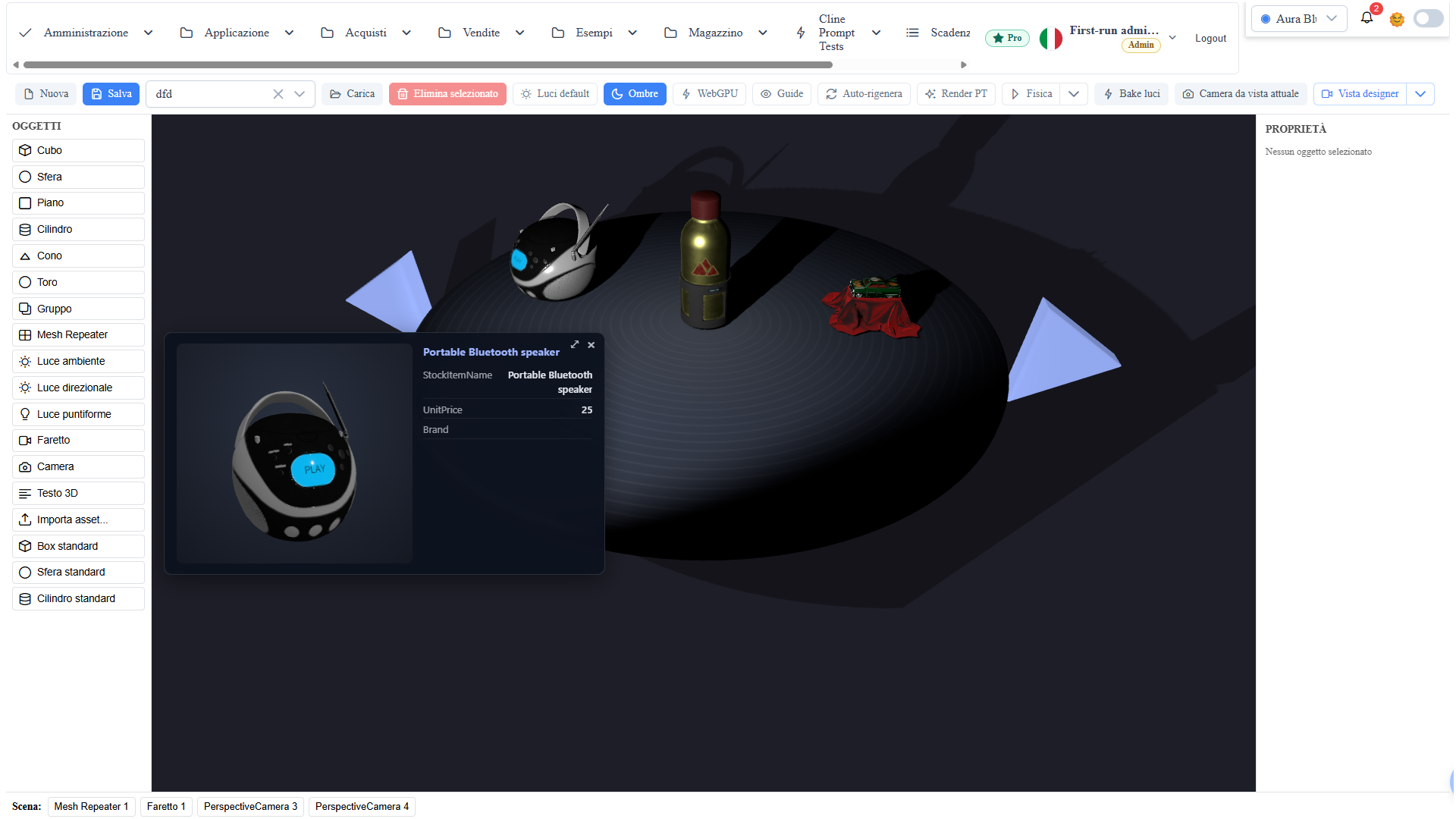
record— the record of the hit instance (raycast), with its fields already unwrapped;mesh— the clickedObject3D; plusevent,scene,camera,THREE;wuic.showItemPopup(opts)— helper for a "fields + mesh preview" popup;
wuic.closePopup() to close it.
showItemPopup accepts: mode (1 HTML overlay with a live 3D preview / 2
3D panel in the scene, billboard toward the camera), fields (columns to show),
title, width/height dimensions (px or %), panelBg, swap (flips the
mesh/fields sides), maximizable, verticalPosition/horizontalPosition and
autorotateMesh (false = you rotate the model with the mouse). In the overlay
preview the wheel zooms.
// "click" callback: popup with the model preview + a few record fields.
wuic.showItemPopup({
  mode: 1,
  title: record.StockItemName,
  fields: ['StockItemName', 'UnitPrice', 'Brand'],
  maximizable: true,
  autorotateMesh: false // inspect the model by rotating it with the mouse
Automatic previews
On save, the designer captures the already-rendered GPU canvas and generates a
preview of the scene (asynchronously, without slowing down the save). The preview
appears in the "Load scene" list next to the name, so scenes are recognizable at
a glance. No configuration or external process is required.
Permissions
- The designer/viewer routes require the
scene3d-designerfeature
(requireFeature on the route guard): without the feature enabled the route is
not reachable.
- The binding respects the target route's permissions: opening CRUD from the
viewer goes through the normal authorization check of the bound route.
- Persistence uses the
MetaService.saveScene3d/getScene3ds/
loadScene3d methods (metadata DB, _wuic_scene3d table), subject to standard
authentication (k-user cookie).
Client/server integration
- Client:
- scene authoring, viewport interactions, gizmo, property panel and binding;
- THREE.Object3D.toJSON() serialization into { version:1, scene, bindings?, viewport?, physics? };
- preview capture from the canvas on save.
- Server:
- upsert/read of the scene on _wuic_scene3d.s3d_scene_json (schema
created/updated automatically on first use, cross-DBMS);
- data resolution of the bound routes on the viewer side.
Operational notes
- Save before navigating away: a
canDeactivateguard warns when there are
unsaved changes.
- Keep object names stable for binding and debugging.
- Verify that the bound routes exist in the metadata before publishing the scene
in the viewer.
- WebGPU requires a recent browser with active support; failing that, the designer
stays on WebGL without any intervention.
Screenshot