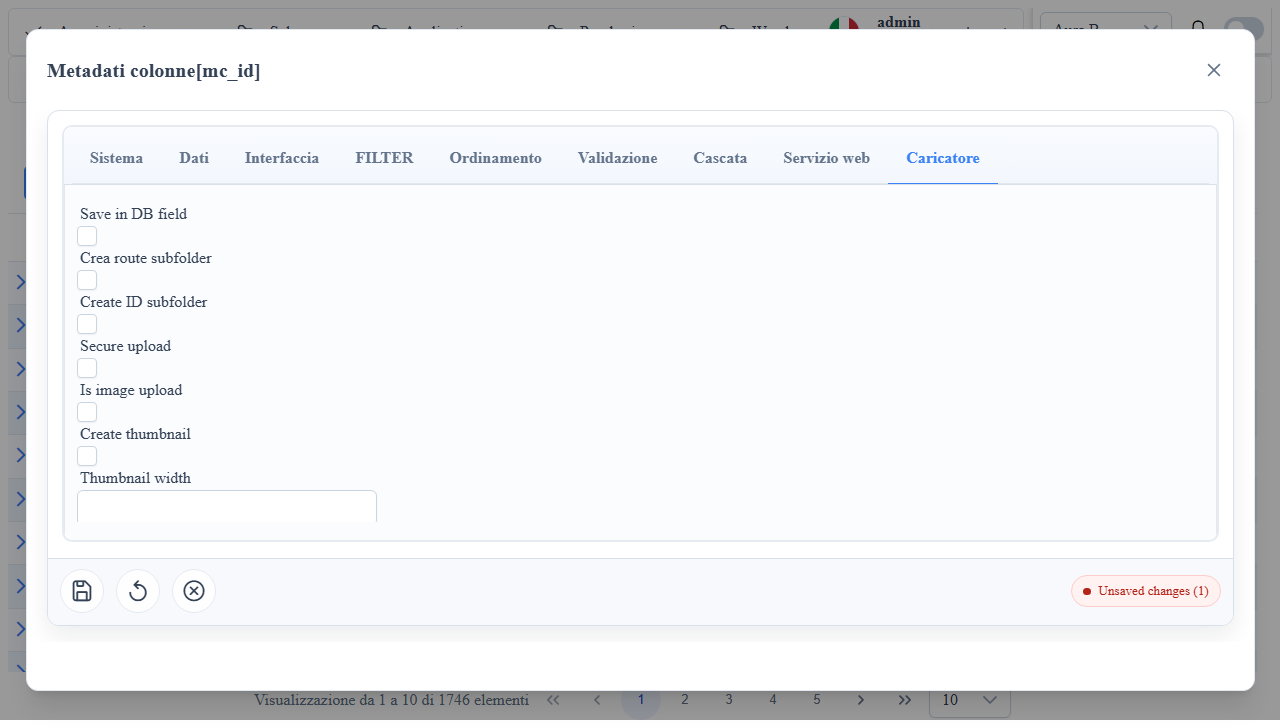
Overview
Widget Upload
Column widget for file uploading with a dedicated Uploader/Upload tab in the column metadata-editor.
When to Use It
- Document/image attachments on records.
- Single or multiple upload with file metadata.
- Scenarios with thumbnails and type/size validations.
Column Metadata Properties (Upload tab)
isImageUpload: enables image handling + preview.isDBUpload: file persistence in the DB.isMultipleUpload: multiple upload.IsZippedUpload: zip archive support.UseRouteNameAsSubfolder: subfolder from route.UseRecordIDAsSubfolder: subfolder from record id.DefaultUploadRootPath: upload root path.allowed_file_types: extension/MIME whitelist.max_file_size: maximum file size.createThumb,thumbWidth,thumbHeight: thumbnail management.customUploadHandlerPath: custom upload endpoint.upload_secure(Secure upload): the column's files are readable only with a session that can see the column; otherwise they are public. See below.
Useful mc_props_bag
Snippet 1JSON
{
  "uploader": {
    "beforeUpload": "function(event, field, record){ return true; }"
  },
  "style": {
    "editCss": "min-height: 52px;"
  },
uploader.beforeUpload: client-side hook before upload submission.style.editCss: uploader area style.form.columns: form layout.
Client/Server Effects
- Client: file picker, preview, immediate validations.
- Server: storage on DB or filesystem according to metadata.
Access to Uploaded Files
| Column | /upload/... (files on disk) | /api/UploadImage (previews, BLOB) |
|---|---|---|
upload_secure off | Public: opens without login, also from emails or external pages | Requires a session |
upload_secure on | Requires a session that can see the column on the route (getFlatRecordData permissions): no login 401, no permission 403 | Same rule: no permission on the column 403 |
- The protected folder is the one the column saves into:
DefaultUploadRootPath(or the root) plus the route subfolder whenUseRouteNameAsSubfolderis on. If a secure column saves into the shared root, the whole root becomes protected: to keep the other files public give the secure column its own folder (DefaultUploadRootPathorUseRouteNameAsSubfolder). - Files already uploaded are not moved: the path is what counts. Changing the flag takes effect within two minutes, immediately after the metadata invalidation.
- A direct link to a protected file does not work outside the application (emails, external sites): use files of non-secure columns there.
- Guest (
enableGuest=true): reads the protected files of the columns it can see, as for the APIs. - Every file is served with
X-Content-Type-Options: nosniff; anything that is not an image, pdf, audio or video is downloaded as an attachment withContent-Security-Policy: sandbox, so an uploaded file never runs as an application page. - Extensions rejected at upload, on every part of the name (
photo.php.pngincluded): server-side executables and scripts (aspx,php,jsp,exe,dll,ps1,sh, ...) and active content (html,htm,svg,js,swf, ...).
Operational Notes
- Always use
allowed_file_types+max_file_sizetogether for hardening. - With multiple upload, verify
MultipleUpload*metadata field mappings. - Upload and
/api/UploadImagerequire login;/uploadrequires it only forupload_securecolumns (see "Access to Uploaded Files"). Download returns only files from the record's folder: of thefilenameparameter only the file name counts. - Subfolders (
UseRouteNameAsSubfolder,UseRecordIDAsSubfolder) andDefaultUploadRootPathare decided by the column metadata read on the server; the values sent by the client count only when the column cannot be resolved (custom handler). The root isuploadFolderif absolute, otherwise<projectDataFolder>/Upload, the same on every provider.
Screenshot