Overview
Notifications
Application notification management, events, and user feedback.
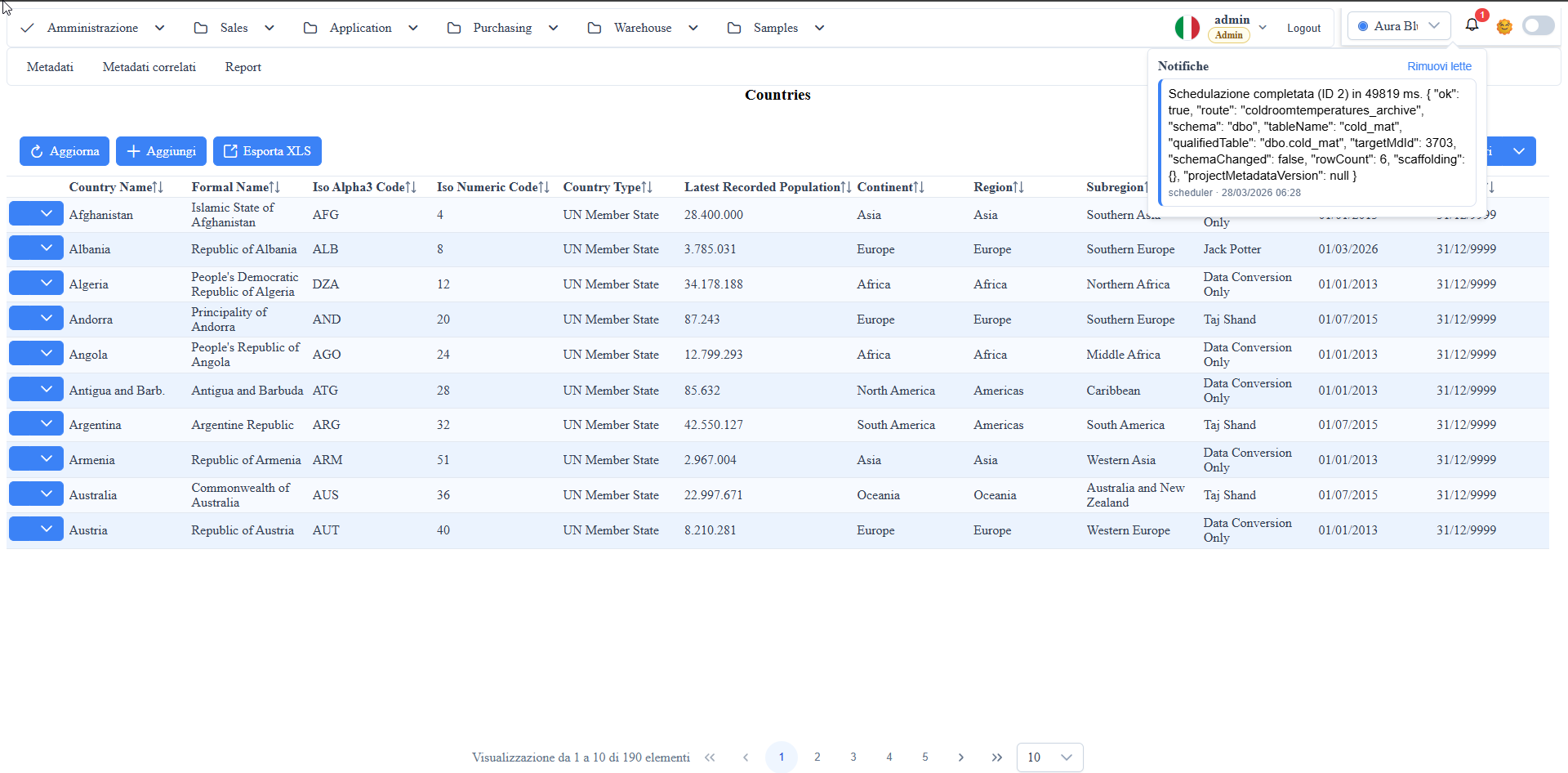
Screenshot Reference (User Manual)
manual__notifications__01.png: notification UI state in theNotificationssubsection.
Functional Architecture
Description:
the feature collects application events, persists them in _notifications, and propagates them in real-time to the UI.
- Storage: metadata DB table
dbo._notifications. - Write path:
POST /api/Notifications/enqueueendpoint usingdbo.sp_enqueue_notification. - Read path:
GET /api/Notifications/unread/{userId}endpoint. - Real-time path: WebSocket
/ws/notifications?userId=...with snapshot push. - UI:
wuic-notification-bellcomponent (notification list popover, unread badge, mark-read and clear-read).
Access and session
- The
api/Notifications/*endpoints and the WebSocket require a valid session; without one they answer 401errors.auth.unauthenticated. - Notifications belong only to their recipient, administrators included:
unread,markallread,clearreadanddismiss-progresswith another user'suserIdanswer 403errors.auth.notification_forbidden;markreadanddelete-readon someone else's notification answer 404, as for a non-existent id. enqueuetowards other users or roles is still allowed, with a valid session.- The WebSocket
/ws/notifications?userId=...accepts only the session'suserId(otherwise 403). Behind a loopback reverse proxy (e.g. the nginx of the Linux packages) it uses the client IP fromX-Forwarded-For, the same one recorded at login: the proxy must forward that header. - With multi-tenant enabled, notifications, WebSocket and watcher work on the metadata DB of the user's tenant (see Multi-tenant).
_notifications Table
Main fields managed by the framework:
id: notification identifier.user_id: target user.type: type (e.g.,info,warning,success, ...).message: text displayed in UI.target_json: click destination (navigation route/path).payload_json: free payload for application detail.is_read,read_at: read status.created_at,deleted_at: timeline and soft-delete.created_atis in UTC: since 1.7.13 the column default is aligned to UTC at startup on all 4 DBMS (migrationfix-notifications-created-at-utc-default). Code that inserts rows by hand must write UTC time.created_by,source: origin traceability.
Triggers / Automations Populating _notifications
Description:
the recommended pattern is to centralize insertion in sp_enqueue_notification, called from triggers or jobs.
- The framework provides the stored procedure
dbo.sp_enqueue_notification(script:scripts/add-notifications-framework.sql). - Application SQL triggers or backend jobs can populate
_notificationsin two ways: - calling
dbo.sp_enqueue_notification(recommended approach); - inserting directly into the table respecting the minimum fields (
user_id,type,message). - Typical pattern: trigger on a business table (
AFTER INSERT/UPDATE) that, when a condition is met, creates a notification for one or more users.
DECLARE @dbName NVARCHAR(256) = DB_NAME();
DECLARE @isBrokerEnabled BIT;

SELECT @isBrokerEnabled = is_broker_enabled
FROM sys.databases
WHERE name = @dbName;
userId: 100275type: "warning"message: "Order delayed"targetJson.route: "#/orders/list"targetJson.filter: "status||eq||late"payloadJson.orderId: 12345
Metadata-Driven Triggers from md_props_bag.notifications.triggerRules
Rules can be centralized in the table metadata (md_props_bag.notifications.triggerRules) and translated into runtime SQL triggers.
- Rule structure:
event,watchColumns,userIdExpr,typeTemplate,messageTemplate,targetTemplate,payloadTemplate,source,triggerName. - Pipeline: metadata route -> SQL trigger generation on server ->
sp_enqueue_notification-> websocket bell (/ws/notifications?...). - DBMS: on SQL Server the trigger calls
sp_enqueue_notificationin the metadata DB; on MySQL, PostgreSQL and Oracle the trigger is row-level and writes to_wuic_notification_outbox(same schema as the table, same transaction), and the backend delivers it tosp_enqueue_notificationeveryNotifications:TriggerOutboxPollSecondsseconds (default 2). A template starting with=is dialect SQL: outside SQL Server the row is read asNEW.column/OLD.column(Oracle:NEW."COLUMN"). Trigger names stay within the DBMS limit (Oracle 30, PostgreSQL 60, MySQL 64), shortened with a hash when needed. - Removal: saving
md_props_bagwithout rules does not drop existing triggers; to remove them callMetaService.removeNotificationTriggerswith{"route":"<route>"}(admin). - Inline snippet (insert):
{"enabled":true,"event":"insert","watchColumns":[],"userIdExpr":"{{owner_user_id}}","messageTemplate":"New record {{id}}"}. - Inline snippet (update):
{"enabled":true,"event":"update","watchColumns":["status"],"userIdExpr":"{{owner_user_id}}","messageTemplate":"Updated {{id}}: {{status}}"}. - Inline snippet (delete):
{"enabled":true,"event":"delete","watchColumns":[],"userIdExpr":"{{owner_user_id}}","targetTemplate":"{\"path\":\"/{{md_route_name}}/list\"}"}. - Result: notification rules versioned at metadata level, no logic duplication in individual manual triggers.
- Metadata context reference: see Metadata (
md_props_bagsection and advanced nodes).
Prerequisite: SQL Server Service Broker
The SqlDependency mode requires that Service Broker be enabled on the metadata database.
Without Service Broker the watcher cannot register the notifications queries and logs:
> Unable to start SqlDependency for _notifications.
> System.InvalidOperationException: The SQL Server Service Broker for the current database is not enabled...
Starting from the current version, the watcher performs an automatic fallback to polling when the broker is unavailable. To achieve optimal performance (instant push without polling) you must enable the broker.
New Installations (first-run wizard)
The first-run wizard automatically enables Service Broker after creating the metadata database. No manual action required.
Existing Installations (upgrade / manual deploy)
Open SQL Server Management Studio, select the metadata database in the dropdown, and execute:
SELECT name, is_broker_enabled FROM sys.databases WHERE name = DB_NAME();After execution, restart the application (IIS Application Pool recycle). The watcher will detect the active broker and switch from polling to native push.
The script is also available as a standalone file: dbms/scripts/first-run/enable-service-broker.mssql.sql.
Quick Check
To check broker status on the current database:
Expected result: is_broker_enabled = 1.
SqlDependency / Polling
- Backend watcher:
NotificationSqlDependencyWatcherregistered as hosted service. - Configurable modes:
SqlDependency(default): registers a dependency on the_notificationsunread query and sends a snapshot when the result changes.Polling: fallback with periodic polling everyPollSeconds. Automatically activated if Service Broker is not available.- Push service:
NotificationPushServicesends snapshots only to users with connected sockets.
UI and User Behavior
notification-bellshows a badge with unread count.- Panel opening: notification list with date/time and type.
- Click on notification:
- mark-read via
POST /api/Notifications/markread/{id}; - navigation to route read from
target_json. Remove readaction:POST /api/Notifications/clearread/{userId}(soft-delete of read notifications).
Export/Import Progress
- Progress notifications contain
progressGuidand reference route intarget_json. - Click on progress notification:
- reopens the progress dialog linked to the same progressGuid;
- does not force redirect if already on the current route.
- Summary notifications (end of import/export) use
target_json.pathto navigate to the grid route.
Relevant AppSettings
Description:
these keys enable the notification subsystem and the table change listening mode.
"Notifications.Enabled": true"Notifications.Mode": "SqlDependency"or"Polling""Notifications.PollSeconds": 5
Enabled: enables/disables the entire notification subsystem.Mode:SqlDependencyorPolling.PollSeconds: interval in seconds whenMode = Polling.
Frontend support:
WtoolboxService.appSettings.notifications.enabled(and compatible aliases) can hide the bell and stop the real-time connection on the client side.
Result:
- backend and frontend stay aligned on notification state;
- in
SqlDependencythe UI receives push updates, inPollingit uses periodic refresh.
Screenshot