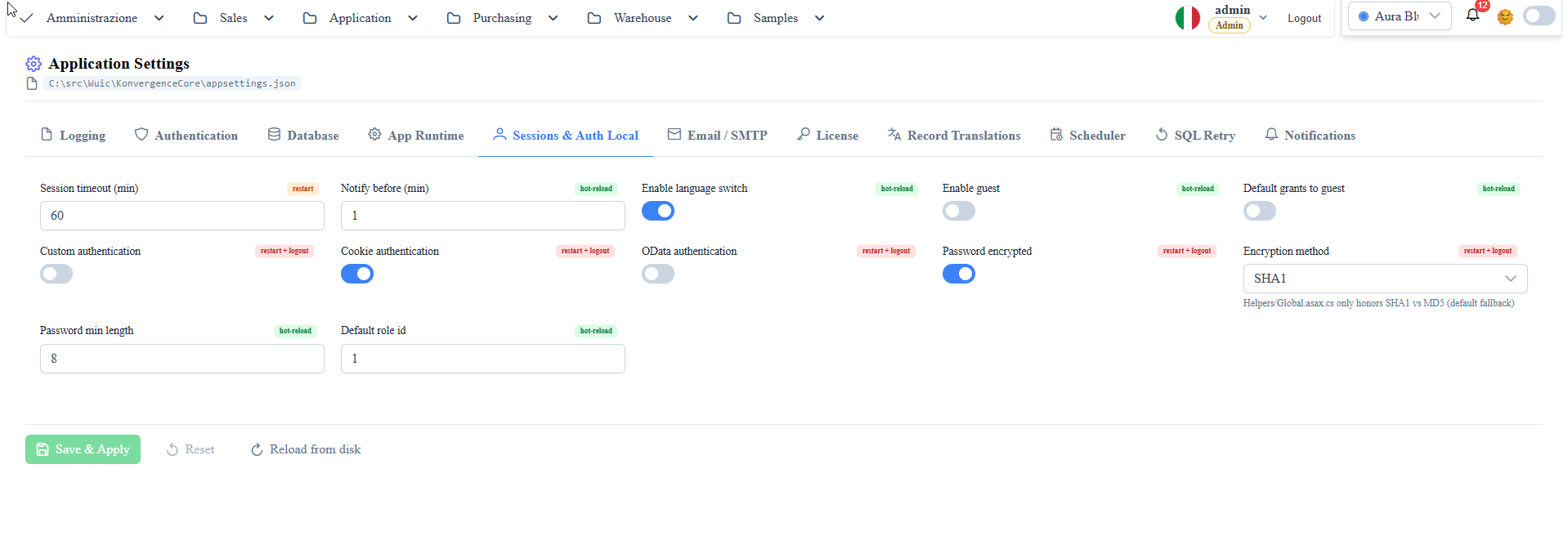
Overview
AppSettings
Application parameters, environment configurations and runtime overrides.
This page documents the keys used by the framework in appsettings.json and appsettings.{Environment}.json.
General conventions
- Values under
AppSettingsare read as strings and then converted (bool/int) by the backend. - For boolean flags use
true|false. - For numeric keys use positive integers (seconds/minutes/timeout).
- Keys are case-sensitive on the JSON side.
Logging
Top-level section Logging:LogLevel (standard .NET). Allowed values for each key: Trace | Debug | Information | Warning | Error | Critical | None. Hot-reload.
Logging:LogLevel:Default
Meaning: default log level for all non-overridden categories.
Typical default: Warning.
Logging:LogLevel:System
Meaning: level for the System category (.NET runtime).
Logging:LogLevel:Microsoft
Meaning: level for the Microsoft category (ASP.NET Core, EF, hosting).
AppSettings - Core bootstrap
firstRun
Meaning: enables the first-time configuration/provisioning flow.
Values: true | false.
Typical default: false.
Note: release packages ship with true (the wizard opens at first start and sets the key back to false). With false the wizard methods ([AsmxFirstRun]) answer only administrators.
preScaffold
Meaning: enables pre-scaffolding of metadata/app objects.
Values: true | false.
Typical default: false.
projectDataFolder
Meaning: application project root (e.g. CrmApp) used for files, assemblies and runtime resources.
Values: absolute filesystem path.
projectAssemblyName
Meaning: application assembly loaded dynamically.
Values: absolute .dll path.
defaultSiteRoute
Meaning: initial client route after bootstrap/login.
Values: hash-route (e.g. #/).
license-email
Meaning: installation email/license.
Values: valid email.
AppSettings - Database and provider
dbms
Meaning: main DB provider for data routes.
Enum-like values: mssql | mysql | postgresql | oracle | xml.
Typical default: mssql.
meta-dbms
Meaning: metadata DB provider (system routes).
Enum-like values: mssql | mysql | postgresql | oracle | xml.
Typical default: same as dbms.
allowMultipleDBMS
Meaning: enables coexistence of multiple providers at runtime.
Values: true | false.
Typical default: false.
connection
Meaning: base connection string used by services/scaffolding.
Values: provider-specific connection string.
DataDBName
Meaning: default data database name.
Values: DB name.
connectionByUser
Meaning: uses a connection/context bound to the current user at specific runtime points.
Values: true | false.
Typical default: false.
AppSettings - CRUD, query, filters
autoGeneratedQueryTimeout
Meaning: timeout (seconds) for auto-generated SQL queries.
Values: positive integer.
Typical default: 120.
storedProcTimeout
Meaning: timeout (seconds) for stored procedure execution.
Values: positive integer.
enableServerSideCrudChangeLog
Meaning: enables server-side logging of CRUD operations.
Values: true | false.
Typical default: true.
optimisticCheckEnabled
Meaning: enables optimistic concurrency control on updates: the save is rejected if the record was modified by another user after it was read (comparison of the version field/data_modifica). Avoids silent overwrites in multi-user scenarios.
Values: true | false. Hot-reload.
logicDeleteField
Meaning: global field for logical deletion (if not defined in the table metadata).
Values: column name.
logicDeleteValue
Meaning: value that represents a "logically deleted record".
Values: string/number compatible with the field type.
Typical default: 1.
cacheDataMinutes
Meaning: in-memory cache of list results (one entry per route and query text, per tenant); a write on the route clears its entries.
Values: missing or 0 = cache off (default, nothing is kept in memory); positive integer = minutes an entry stays valid; -1 = no expiry.
Limit: at most 500 queries per route; to make room, expired entries are removed first, then the oldest ones.
cacheDataIncludedRoutes
Meaning: whitelist of cacheable routes.
Values: comma-separated list of routes.
cacheDataExcludedRoutes
Meaning: blacklist of routes to exclude from the cache.
Values: comma-separated list of routes.
traceQuery
Meaning: enables SQL query tracing with execution times.
Values: true | false.
Typical default: false.
sqlVerbose
Meaning: enables verbose SQL output in endpoints/tools that support it.
Values: true | false.
On SQL Server the list read passes filter values and paging as parameters (@wq0, @wq1..., @wq_skip, @wq_take): the reported query (sqlQuery in the response and _log_query with traceQuery) starts with one DECLARE per parameter with its value, followed by the query, and runs as is in SSMS, e.g. DECLARE @wq0 varchar(8000) = '%Tailspin%'; DECLARE @wq_skip int = 25; DECLARE @wq_take int = 25;. On MySQL, PostgreSQL and Oracle the values travel the same way (@wq0... on MySQL and PostgreSQL, :wq0... on Oracle) and the reported query has three parts: a comment listing the parameters and their values (-- WUIC parametri: @wq0 = '%Tailspin%', @wq_skip = 25, ...), the parametric query as it reaches the DBMS, commented line by line after -- WUIC query parametrica: (with @wq0/:wq0 in place of the values), and after -- WUIC query eseguibile (valori al posto dei parametri): the same query with the values in place of the placeholders, the only uncommented part: it can be pasted and run as is in MySQL Workbench, psql/pgAdmin or SQL Developer. Queries without parameters keep the usual format.
logInvoke
Meaning: enables logging of dynamic function/callback invocations.
Values: true | false.
maxConcurrentExports
Meaning: maximum number of XLS exports the process runs at the same time; the others wait in a queue and the progress dialog and the notification show their position ("Queued: position N").
Values: positive integer.
Note: if absent or invalid, the backend uses half of the machine's cores (at least 1). The limit is per process: every node or application pool has its own.
Sizing: every running export uses about 1.3 cores and keeps the uncompressed sheet in memory until the file is closed (measured on 25/09/2026 with 228k rows x 13 columns: ~300 MB per export). On a machine shared with other application pools a value lower than the default is advisable: on the public demo (8 cores, 8 application pools) it is 2, because 4 exports together took the process to 60-75% of the machine.
Example: "maxConcurrentExports": "2" in AppSettings (appsettings.json or the environment overlay, e.g. appsettings.Demo.json); the value is read at every export, but after editing the file recycle the application pool if the configuration does not reload by itself.
maxQueuedExports
Meaning: maximum number of exports waiting; beyond it the request answers 503 errors.metaservice.export.queue_full (every queued export keeps a request thread busy).
Values: positive integer.
Note: if absent or invalid, the backend uses 10.
AppSettings - Security, login, session
customAuthentication
Meaning: delegates authentication to custom application logic.
Values: true | false.
enableCookieAuthentication
Meaning: controls who writes the k-user session cookie, with which policy, and how the server checks it.
Values: false | true | "signed" ("signed" since 1.7.21). Default: false. Changing it requires a restart and a new login.
Concise comparison of the three modes:
| Aspect | false (client-managed) | true (server-managed, token) | "signed" (server-managed, signed) |
|---|---|---|---|
| Who writes the cookie | Frontend JavaScript after login | Backend via Set-Cookie | Backend via Set-Cookie |
| Format | k-user=<urlencoded-json> | k-user=<urlencoded-json> | k-user=s1.<expiry>.<signature>.<json> (HMAC-SHA256 signature, content not encrypted) |
HttpOnly | No (readable by JS) | Yes (XSS protection) | Yes |
SameSite | — | Lax (CSRF protection) | Lax |
Secure | — | Yes over HTTPS, off on http://localhost | Same as true |
| Expiry | — | sessionTimeoutMinutes (default 60), renewed at every request | Same as true; the expiry is also inside the signature, so the server enforces it |
| Server-side check at every request | Privileges and role declared in the cookie compared with the DB | Token + IP + timeout on DB | Signature and expiry; privileges and role compared with the DB |
| Sessions per user | Several concurrent sessions | Only one (last login wins) | Several concurrent sessions |
| Cookie editable by the client | Yes, including the user: the DB only blocks privileges higher than those of the given user, not the identity (see below) | No | No: any change invalidates the signature |
| IP binding | No | Yes (IP change forces re-login) | No |
| Required DB schema | Standard | Columns token, ip, LastActivityDate | Table _wuic_revoked_sessions (created automatically at startup) |
| Logout | MetaService.logout | MetaService.logoutSession (clears the DB token) | MetaService.logoutSession (revokes that browser's session) |
| When to use it | Development and CI only: it does not authenticate (see below) | Production exposed to the internet, one session per user | Production with several sessions per user (shared accounts, demos, multiple browsers) |
### Single-session behavior (mode true)
Each login generates a new token that overwrites the previous one. Practical consequences:
- If the same user logs in from two different browsers (or two incognito windows), the last login wins: the first browser is disconnected with the message "Session terminated: the same user has logged in from another browser." — whether navigating a page or refreshing.
- The browser with the last login is not affected.
- Two tabs in the same browser do not have this problem: they share the same cookie, so the token is updated on both.
### Mode "signed" (since 1.7.21)
- The cookie is signed with the cookie-signing-key key (see below). Missing or invalid signature, expired or edited cookie: it counts as no cookie, the request answers 401 errors.auth.unauthenticated and the frontend goes back to the login.
- As with false, several logins of the same user coexist: a new login does not disconnect the other browsers. Unlike false, the client cannot change anything in the cookie (user, role, company, language).
- Every login is a session of its own (sid inside the signed cookie, unchanged by renewals). Logout revokes it on the DB (_wuic_revoked_sessions): the cookie of that browser and every copy of it are rejected, the other sessions of the same user stay logged in. Details in the next section.
- The frontend never writes the cookie: language change (MetaService.setCurrentUserLanguage) and company change (MetaService.switchAzienda) re-issue it from the server.
- Scripts and tests that call the API must send back the cookie received from the login (cookie jar or Set-Cookie) as is, without building it: backend-api-client.mjs and the scaffold-*.ps1 scripts already do so.
### Login, logout and several sessions of the same user
A "session" is a k-user cookie. Tabs and windows of the same browser (same profile, not incognito) share a single cookie, so they are always one session, in all three modes: a login in one tab applies to all of them (even with a different user, who replaces the previous one), and a logout in one tab also disconnects the others at their next request. Independent sessions need different browsers, different profiles or an incognito window.
| Case | false | true | "signed" |
|---|---|---|---|
| Second login of the same user from another browser or device | Both stay logged in | The first browser is disconnected at its next request (session_replaced) | Both stay logged in |
| Logout from a browser | The frontend deletes the cookie; there is nothing to close on the server | Token cleared on the DB: the cookie is no longer valid | Revokes that browser's session; the other sessions of the same user stay logged in |
| Copy of the cookie used after logout | Valid. The cookie only holds the user_id: it can even be built without ever receiving it | Rejected (401) | Rejected (401): the session is revoked on the DB |
No request for more than sessionTimeoutMinutes | No server-side expiry | Session expired (session_expired): new login | Cookie expired: new login, on that browser only |
Logout of another user by an administrator (MetaService.logout) | No server-side effect | The user is disconnected immediately | All their sessions opened up to that moment are rejected; a new login works. With multi-tenant it applies only to the user of that company, not to users with the same id in other companies |
Password reset (MetaService.resetPassword) or new password saved on the users row | No effect on sessions | No effect on open sessions; the next login uses the new password | Every open session of the user is rejected, including the one saving it if it is theirs: log in again with the new password (since 1.7.21) |
Session used without pauses for more than signedSessionMaxLifetimeHours (default 24 hours) | No limit | No limit: it expires only through inactivity | Rejected: new login, even while in use (since 1.7.21) |
| IP address change | No effect | New login required | No effect |
| User deleted or role changed | Rejected at the next request | Rejected at the next request | Rejected at the next request |
In practice:
- false does not authenticate: whoever knows or guesses a user_id gets in as that user. Use it only for development and CI, never on an installation reachable by others. As a reminder, at every start the backend writes the log line [security] enableCookieAuthentication=false: NESSUNA autenticazione... and the AppSettings editor asks for confirmation before saving false.
- true and "signed" close the session also for whoever holds a copy of it, both with your own logout and with an administrator's.
- The difference is in concurrent sessions: with true the last login kicks out the other browsers, with "signed" they coexist and logout closes only the browser that asks for it (an administrator's closes them all). To close the sessions of every user at once, change cookie-signing-key.
### Known pitfalls
- If you edit appsettings.json by hand while the backend is running, a restart is required (the web AppSettings editor performs the flush automatically).
- After flipping from false to true, pre-existing cookies do not have the token → users must log in again.
- The E2E tests (backend-api-client.mjs) detect the mode automatically and work in both cases.
- Since 1.7.13 the token and expiry check applies to every provider, PostgreSQL and Oracle included, and logout closes only the caller's session: see Authentication & Authorizations.
- After a mode change the cookies already issued are no longer valid (switching to "signed" the signature is missing; going back to true/false the signed cookie is not JSON) → users must log in again.
- In the AppSettings editor the key is a three-value list; in the file both the strings "true"/"false"/"signed" and JSON booleans are accepted.
cookie-signing-key(since 1.7.21)
Meaning: HMAC-SHA256 key that signs the k-user cookie with enableCookieAuthentication = "signed"; ignored in the other modes.
Values: base64 of at least 32 bytes, e.g. the output of [Convert]::ToBase64String([Security.Cryptography.RandomNumberGenerator]::GetBytes(32)).
Default: empty. When empty, the backend generates it at the first login and saves it in appsettings.json; if the file is not writable (or the current value is not valid) it uses an in-memory key and a new login is needed after every restart.
Note: it is a secret (whoever knows it can sign valid cookies): do not commit it or copy it between installations. With several instances behind a load balancer it must be set by hand, identical on all of them: left empty, each instance generates its own and the cookies issued by one are not valid on the others (random 401s). Changing it disconnects every user.
Log: at startup, in "signed" mode, the backend writes the key fingerprint ([security] enableCookieAuthentication=signed: impronta della chiave di firma 1a2b3c4d5e6f7a8b ...: the first 8 bytes of the SHA-256, not the key). Different fingerprints across instances = different keys. A key generated on the fly is reported by the line [security] cookie-signing-key generata ora...: if it shows up at every start, the saved value is not being read (e.g. an environment variable or an appsettings.{Environment}.json that sets it empty).
signedSessionMaxLifetimeHours(since 1.7.21)
Meaning: maximum lifetime of a "signed" session, in hours from login. The cookie is renewed at every request, but renewal does not move the login time: after these hours the session is rejected even while in use and a new login is needed. It limits how long a stolen copy of the cookie can be used. Ignored in the other modes.
Values: integer; 0 = no limit (not recommended: a copy of the cookie used continuously never expires).
Default: 24 (also when the value is empty, not numeric or negative). Read at every request.
Note: revocations in _wuic_revoked_sessions are kept until login + maximum lifetime + sessionTimeoutMinutes, so a revoked cookie does not become valid again when the row is deleted.
enableODATAAuthentication
Meaning: enables auth for OData endpoints.
Values: true | false.
Note: since 1.7.13 the /odata/* data endpoints always require a valid session, regardless of this key. Since 1.7.21 so do /odata, /odata/$metadata and /odata/openapi.json (see odataPublicMetadata).
odataPublicMetadata(since 1.7.21)
Meaning: true = /odata, /odata/$metadata and /odata/openapi.json answer without a session, as up to 1.7.20: anyone can see which tables are exposed and with which columns (not the data). For clients that read the service shape before authenticating.
Values: true | false.
Default: false (a session is required, as for the data). Read on every request.
apiTokensEnabled(since 1.7.21)
Meaning: personal tokens for external OData clients (Power BI, Excel, scripts). Each user creates them from the user menu ("API tokens"); they work only on /odata, with the owner's permissions and in the company where they were created (see OData, section "Personal tokens").
Values: true | false.
Default: false. Read on every request (no restart): when off, existing tokens are rejected (401 errors.auth.api_tokens_disabled) and the menu item disappears.
apiTokenMaxLifetimeDays(since 1.7.21)
Meaning: maximum validity of a personal token, in days. Every token has an expiry: 90 days by default (or this value, if lower).
Values: integer > 0.
Default: 365 (also when empty, non-numeric or <= 0). Read on every request.
apiTokenAllowedRoles(since 1.7.22)
Meaning: ids of the roles (comma separated) that can create and use personal tokens. Removing a role also stops the tokens its users already created; superadmins always can.
Values: list of role ids.
Default: empty (every role). Read on every request.
apiTokenWriteRoles(since 1.7.22)
Meaning: ids of the roles (comma separated) that can create and use tokens with write access (odata.write). Removing a role makes the write tokens already created read-only.
Values: list of role ids.
Default: empty (every role that can create tokens). Read on every request.
odataMaxTop(since 1.7.22)
Meaning: largest $top accepted on /odata/<entity set>; a larger value answers 400.
Values: integer > 0.
Default: 1000 (also when empty, non-numeric or <= 0). Read on every request.
odataMaxExpandDepth(since 1.7.22)
Meaning: deepest $expand nesting (a($expand=b) = 2); deeper answers 400.
Values: integer > 0.
Default: 2. Read on every request.
forwardedHeadersKnownProxies/forwardedHeadersKnownNetworks(since 1.7.22)
Meaning: IP addresses (and CIDR networks, e.g. 10.0.0.0/8) of the reverse proxies or load balancers in front of the backend whose X-Forwarded-For is trusted, in addition to localhost. Without them the client IP is the proxy's, and rate limits (login, API tokens) hit every client behind it together.
Values: comma-separated lists.
Default: empty (localhost only). Read at startup.
enableHttpsRedirection
Meaning: forces the HTTP→HTTPS redirect + HSTS. Default false (no redirect, no HSTS): the app responds over both HTTP and HTTPS. Set true ONLY on hosts with a valid HTTPS certificate (activates UseHttpsRedirection/UseHsts).
Values: true | false. Default: false. Restart.
Meaning: enables guest access.
Values: true | false.
applyGrantByDefaultToGuest
Meaning: applies default grants to the guest user as well.
Values: true | false.
grantDashSaveToGuest
Meaning: allows the guest to save dashboards.
Values: true | false.
default-role-id
Meaning: role assigned as fallback/default.
Values: integer (role ID).
Note: for registration it must point to an existing role without admin/superadmin rights, otherwise registration is refused.
registrationEnabled
Meaning: enables self-service user registration. Without an explicit true registration is not available.
Values: true | false.
Default: false.
loginRateLimitPerIpPerMinute(since 1.7.16)
Meaning: maximum number of login attempts per minute (successful or not) from the same IP; once exceeded, the IP gets HTTP 429 errors.auth.login_rate_limited for 1 minute. Protects against credential stuffing (many usernames tried from the same IP).
Values: integer; 0 = per-IP limit off.
Default: 0 (also when the value is not numeric or is negative).
Note: on installations exposed to the internet it should be set, e.g. 30. The per-user limit (5 wrong passwords in 5 minutes, 1-minute lockout) is always on and does not depend on this key. Loopback is never limited. Up to 1.7.15 the per-IP limit was fixed at 30 attempts per minute, with only loopback exempt. Details in Authentication & Authorizations.
Example: "loginRateLimitPerIpPerMinute": "30"; the value is read at every login, but after editing the file recycle the application pool if the configuration does not reload by itself.
loginRateLimitExemptIps(since 1.7.16)
Meaning: IPs exempt from the login attempt limit, treated like loopback: they are never limited or counted. Meant for stress tests that log in hundreds of users from the same IP.
Values: comma-separated IPs (spaces allowed). The match is exact; the IPv4-mapped form (::ffff:10.0.2.2) is equivalent to 10.0.2.2.
Example: "loginRateLimitExemptIps": "10.0.2.2, 192.168.1.50".
sessionTimeoutMinutes
Meaning: user session timeout in minutes.
Values: positive integer.
Typical default: 60.
notifySessionExpirationBefore
Meaning: lead time (minutes) for the session expiration notice.
Values: positive integer.
Typical default: 1 or 2 depending on the environment.
enableUserLanguageSwitch
Meaning: enables the user language switch in the UI.
Values: true | false.
AppSettings - Password and credential policy
IsPwdEncripted
Meaning: indicates whether the passwords in the store are hashed.
Values: true | false.
encriptionMethod
Meaning: legacy hash algorithm used for password verification.
Enum-like values: SHA1 | MD5.
Typical default: SHA1.
password_min_lengthandpassword_min_length
Meaning: minimum password length (note: in some files a variant with a trailing space in the key name exists).
Values: positive integer.
Typical default: 8.
AppSettings - Captcha, double token, application URLs
captcha_public_key
Meaning: captcha public key.
Values: string.
captcha_private_key
Meaning: captcha private key.
Values: string.
enableDoubleTokenAuthentication
Meaning: enables an additional token verification step in the intended login/activation flow.
Values: true | false.
site-url
Meaning: site base URL for absolute email/workflow links.
Values: absolute URL.
content-url
Meaning: base URL for content/confirmation links (mailing, read-confirm, etc.).
Values: absolute URL.
AppSettings - Email and mail notifications
email-host
Meaning: SMTP host.
Values: hostname/IP.
email-port
Meaning: SMTP port.
Values: integer (25, 465, 587, ...).
email-ssl
Meaning: enables SMTP TLS/SSL.
Values: true | false.
email-user
Meaning: SMTP username.
Values: string.
email-pwd
Meaning: SMTP password.
Values: string/secret.
email-sender-address-mailing
Meaning: sender for mailing/notification emails.
Values: valid email.
email-sender-name-mailing
Meaning: mailing sender display name.
Values: string.
email-sender-address-registration
Meaning: sender for registration/activation emails.
Values: valid email.
Note: since 1.7.13 it no longer turns registration on: registrationEnabled = true is required.
email-admin-registration
Meaning: administrative recipient for registration events.
Values: valid email.
email_confirm_token_subject
Meaning: subject template for the token confirmation email.
Values: string.
email_confirm_token_body
Meaning: body template for the token confirmation email.
Values: string (HTML allowed).
AppSettings - Upload and media
uploadFolder
Meaning: root folder for file/image uploads.
Values: absolute path. A relative value is ignored and <projectDataFolder>/Upload is used.
Note: since 1.7.13 the code that writes the file and the code that reads it back for BLOB columns use the same resolution on every provider.
base64Image
Meaning: forces handling of images in base64 format where applicable.
Values: true | false.
AppSettings - Report and report viewer runtime
ReportMode
Meaning: report rendering mode in the viewer.
Observed enum-like values: web (default fallback) and custom modes handled controller-side.
Note: if absent, the backend uses the web fallback.
reportQueryTimeout
Meaning: timeout for report dataset queries (seconds), applied to the SQL data sources left at the Designer default timeout (30).
Values: positive integer.
Note: if absent or invalid, the backend uses the 120 fallback.
AppSettings - Record translations (legacy keys in AppSettings)
recordTranslationsEnabled
Meaning: enables per-field record translation.
Values: true | false.
recordTranslationsDefaultTableName
Meaning: default record translations table.
Values: table name.
recordTranslationsTranslationJsonFieldName
Meaning: name of the translations JSON field.
Values: column name.
recordTranslationsDefaultLanguage
Meaning: fallback language for record translations.
Values: culture code (e.g. it-IT, en-US).
recordTranslationsFieldNames
Meaning: list of translatable fields.
Values: comma-separated list.
Related top-level sections (outside AppSettings)
RecordTranslations:Enabled
Meaning: main runtime switch for record translations.
Values: true | false.
RecordTranslations:DefaultTableName
Meaning: physical translations table.
Values: table name.
RecordTranslations:TranslationJsonFieldName
Meaning: translations JSON field.
Values: column name.
RecordTranslations:DefaultLanguage
Meaning: fallback language.
Values: culture code.
RecordTranslations:FieldNames
Meaning: translatable fields.
Values: array of strings.
Scheduler:Enabled
Meaning: enables the scheduling hosted service.
Values: true | false.
Scheduler:PollSeconds
Meaning: scheduler polling in seconds.
Values: positive integer.
Scheduler:MaxTasksPerCycle
Meaning: maximum tasks processed per cycle.
Values: positive integer.
Scheduler:RetryDelaySeconds
Meaning: retry delay for failed tasks.
Values: positive integer.
Scheduler:SqlCommandTimeoutSeconds
Meaning: scheduler SQL timeout.
Values: positive integer.
Notifications:Enabled
Meaning: enables the realtime notifications subsystem.
Values: true | false.
Notifications:Mode
Meaning: backend notifications watcher mode.
Enum-like values: SqlDependency | Polling.
Notifications:PollSeconds
Meaning: notifications polling if Mode = Polling.
Values: positive integer.
notificationInitialSnapshotConcurrency(inAppSettings)
Meaning: how many newly opened WebSockets read and send the initial snapshot of unread notifications at the same time; the others wait their turn without holding a thread or a connection to the metadata DB.
Values: integer; 0 or negative = no limit.
Note: if absent or invalid, the backend uses 32. It is read once, at the first WebSocket connection of the process: restart the backend after changing it. The limit is per process.
Why: during a burst of logins (load test with 6000 users, MySQL) every new socket held a metadata pool connection for its snapshot, and the pool ran out before the regular requests.
Authentication:OAuth:Enabled
Meaning: enables OAuth/OIDC login.
Values: true | false.
Authentication:OAuth:Provider
Meaning: OAuth provider displayed/handled.
Enum-like value used in config: Google (extendable to OIDC-compatible custom providers).
Authentication:OAuth:Authority
Meaning: OIDC authority/issuer.
Values: URL.
Authentication:OAuth:ClientId
Meaning: OAuth application client id.
Values: string.
Authentication:OAuth:ClientSecret
Meaning: OAuth client secret.
Values: string/secret.
Authentication:OAuth:RequireHttpsMetadata
Meaning: requires OIDC metadata over HTTPS.
Values: true | false.
Authentication:OAuth:CallbackPath
Meaning: signin callback path.
Values: absolute path.
Authentication:OAuth:SignedOutCallbackPath
Meaning: signout callback path.
Values: absolute path.
Authentication:OAuth:AllowedReturnOrigins
Meaning: whitelist of allowed return origins.
Values: array of URLs/origins.
Authentication:OAuth:Scopes
Meaning: scopes requested from the provider.
Values: array of strings (openid, profile, email, ...).
ADFS via OpenID Connect
ADFS 4.0+ (Windows Server 2016+) speaks OIDC natively: integration with WUIC requires no new code, just the Authentication.OAuth section configured on the ADFS tenant. The pipeline is the same as Google/Auth0/Keycloak — Provider="OpenIdConnect" routes the flow to services.AddOpenIdConnect(...).
Prerequisites on the ADFS side:
1. Federation Service Name reachable over HTTPS from the WUIC backend (e.g. https://adfs.contoso.com/adfs).
2. OIDC endpoint enabled: verify that https://adfs.contoso.com/adfs/.well-known/openid-configuration returns 200 with the discovery document.
3. Application Group registered in the ADFS Management Console (adfs.msc → Application Groups → Add Application Group → "Server application accessing a web API"):
- Redirect URI: https://<host-wuic>/signin-oidc
- Note down the ClientId (auto-generated) and generate a ClientSecret.
4. Issuance Transform Rules on the Web API: emit at least email, name, upn as claims (needed by the frontend to populate the user profile).
Configuration on the KonvergenceCore side:
"Authentication": {
  "OAuth": {
    "Enabled": true,
    "Provider": "OpenIdConnect",
    "Authority": "https://adfs.contoso.com/adfs",
    "ClientId": "<application-group-client-id>",
    "ClientSecret": "__SET_VIA_SECRET_MANAGER__",
Known pitfalls:
- `RequireHttpsMetadata=true` mandatory in production: ADFS exposes the signed metadata over HTTPS; never disable it except in dev against an ADFS with a self-signed cert.
- `CallbackPath` must match the Redirect URI registered in ADFS literally (case-sensitive on the path). If you change one, change the other too.
- Scopes: ADFS supports
openid,profile,email, and custom scopes defined in the Application Permissions. If you request a scope not granted to the client, ADFS responds withinvalid_scopeduring consent. - Single Logout (SLO):
SignedOutCallbackPathis called only if ADFS is configured to emit the logout token. If it is missing, after the WUIC logout the browser stays logged in to ADFS and a new WUIC login is silent SSO. - Coexistence with LDAP: the
Authentication.OAuthsection (browser-redirect federation) andAuthentication.Ldap(direct bind from username/password) are independent. They can coexist — the front-end shows a "Login with ADFS" button in addition to the local form. - Provider distinct from Google: the
Provider==Googlebranch usesAddGoogle()with hard-wired scopes. For ADFS set `Provider=OpenIdConnect` (notGoogle), otherwise the pipeline points toaccounts.google.com. - ADFS 2.0 / 3.0 (Windows Server 2008R2-2012R2): they speak only WS-Federation or SAML 2.0, not OIDC. Those tenants would need an additional PackageReference (
Microsoft.AspNetCore.Authentication.WsFederationorSustainsys.Saml2) and a new branch inStartup.ConfigureServices— out of scope for this section.
Authentication:Ldap (LDAP / Active Directory)
WUIC supports LDAP/AD authentication as an optional provider before the traditional DB login (LDAP-first). When Authentication:Ldap:Enabled=true, the backend attempts a bind against the configured directory server; if the bind succeeds and the user does not yet exist in the local users table, they are auto-provisioned with Authentication:Ldap:DefaultRoleId (or, as a fallback, AppSettings:default-role-id). If LDAP is offline and FallbackToDbOnFailure=true, the login automatically falls back to the DB provider — useful to guarantee admin/admin access even during a directory server outage.
Minimal example:
"Authentication": {
  "Ldap": {
    "Enabled": true,
    "Host": "ldap.corp.example.com",
    "Port": 389,
    "UseStartTls": true,
    "BaseDn": "OU=Users,DC=corp,DC=example,DC=com",
Available keys:
Authentication:Ldap:Enabled
Meaning: enables the LDAP provider in front of the DB. When false, the flow is identical to a deployment without the section.
Values: true | false.
Authentication:Ldap:Host
Meaning: hostname of the directory server (AD DC, OpenLDAP, ApacheDS).
Values: string.
Authentication:Ldap:Port
Meaning: port of the directory server.
Values: integer. Typically 389 (plain or StartTLS) or 636 (LDAPS).
Authentication:Ldap:UseSsl
Meaning: opens the connection directly in LDAPS (TLS at-connect).
Values: true | false.
Authentication:Ldap:UseStartTls
Meaning: opens in plain and then promotes to TLS via the StartTLS extended op (RFC 4511).
Values: true | false. Mutually exclusive with UseSsl.
Authentication:Ldap:BaseDn
Meaning: base DN under which to search for users.
Values: DN string (e.g. DC=example,DC=com).
Authentication:Ldap:UserSearchFilter
Meaning: LDAP filter to locate the user entry. The {username} placeholder is replaced with the username (RFC 4515 escaping applied on the C# side to prevent injection).
Values: filter string. Default: (&(objectClass=user)(sAMAccountName={username})) (Active Directory). For OpenLDAP typically use (&(objectClass=inetOrgPerson)(uid={username})).
Authentication:Ldap:UsernameAttribute
Meaning: entry attribute from which to read the canonical username (used as username_column_name in the local users table).
Values: string. Default: sAMAccountName.
Authentication:Ldap:DisplayNameAttribute
Meaning: attribute from which to read the display name (used as user_description_column_name).
Values: string. Default: displayName.
Authentication:Ldap:EmailAttribute
Meaning: attribute from which to read the email (used as email_column_name).
Values: string. Default: mail.
Authentication:Ldap:BindDn
Meaning: DN of the read-only service account used for the search. Empty = anonymous bind (some ADs allow it for limited searches, OpenLDAP usually does not).
Values: DN string.
Authentication:Ldap:BindPassword
Meaning: service account password. Never commit it: use a secret manager/env var (Authentication__Ldap__BindPassword) or fill it in post-install from the AppSettings editor.
Values: string/secret.
Authentication:Ldap:ConnectTimeoutSeconds
Meaning: connection timeout (in seconds) to the directory server. On expiry the login falls back to the DB if FallbackToDbOnFailure=true.
Values: positive integer. Default: 5.
Authentication:Ldap:FallbackToDbOnFailure
Meaning: if LDAP is unreachable or returns an error not related to credentials, it falls back to the traditional DB login. Guarantees admin/admin access during a directory outage.
Values: true | false. Default: true.
Authentication:Ldap:AutoProvision
Meaning: on the first successful LDAP login of a user unknown to the local DB, automatically creates the row in _metadati__tabelle.user_table_name (default utenti) with the default role.
Values: true | false. Default: true.
Authentication:Ldap:DefaultRoleId
Meaning: role id assigned during auto-provisioning. Overrides AppSettings:default-role-id. If both are null, the default is 1.
Values: integer or null.
Known pitfalls
- Bind password never committed: the
appsettings.linux.*.jsontemplate uses__SET_LDAP_BIND_PASSWORD__as a placeholder; the deploy script substitutes it. For the "dev" templates (appsettings.json,appsettings.Development.json) the default value is the empty string — never a real secret. - AD vs OpenLDAP filter: AD uses
sAMAccountName, OpenLDAP usesuid. ChangeUserSearchFilterandUsernameAttributeaccordingly. - StartTLS on port 636: common mistake. 636 is LDAPS (
UseSsl=true); StartTLS runs on 389. - No change to the cookie path: LDAP and DB users receive the same
k-usercookie. The difference is only in how the credentials are authenticated. - Sentinel password: the provisioner inserts
'__LDAP__'as the value of the local password column for auto-provisioned users. It is never used to authenticate (the LDAP bind has already validated), but the column must be NOT NULL-compatible. - Runtime toggle: all
Authentication:Ldap:*keys areRestartAndLogout: editing them from the AppSettings editor requires a clean restart.
AppSettings - License
WUIC license keys (RSA signature verified at bootstrap). Hot-reload.
license-email
Meaning: email the license is issued to (see also Core bootstrap).
Values: valid email.
license-payload
Meaning: license payload in Base64 (tier, enabled features, expiry, machine fingerprint). Read and verified against license-signature + license-public-key-pem.
Values: Base64 string.
license-signature
Meaning: RSA signature of the license-payload. If invalid, the license is rejected and the gated features stay disabled.
Values: Base64 string.
license-public-key-pem
Meaning: RSA public key (PEM) used to verify the signature. The private key never leaves the issuing machine.
Values: PEM.
SQL Retry (SqlMapperRetry)
Automatic retry with backoff on transient SQL operations (deadlock, timeout, lost connection). All keys require a restart.
Release packages use MaxAttempts = 3 and BaseDelayMs = 100, and the release pipeline rejects lower values: if an upgraded installation has lower values, set them back to these.
SqlMapperRetry:Enabled
Meaning: enables automatic retry on transient SQL errors.
Values: true | false.
SqlMapperRetry:MaxAttempts
Meaning: maximum number of attempts before propagating the error.
Values: positive integer.
SqlMapperRetry:BaseDelayMs
Meaning: base delay (ms) for the exponential backoff between attempts.
Values: positive integer.
SqlMapperRetry:UseJitter
Meaning: adds random jitter to the delay to avoid thundering-herd.
Values: true | false.
SqlMapperRetry:RetryReadOperationsOnly
Meaning: limits the retry to read operations only (non-idempotent writes are not retried).
Values: true | false.
SqlMapperRetry:RetryOnTransaction
Meaning: allows the retry even when the operation is inside an explicit transaction.
Values: true | false.
Crash Reporting (CrashReporting)
Sends anonymized stacktraces to the WUIC crash-reporter server. Requires explicit GDPR consent before activation. All keys require a restart (middleware/hosted service registered at startup based on Enabled).
CrashReporting:Enabled
Meaning: sends the anonymized error details to the private WUIC server. Requires explicit GDPR consent before activation.
Values: true | false.
CrashReporting:UpstreamUrl
Meaning: receiver endpoint. Default https://errors.wuic-framework.com. To be overridden only for self-hosted on-prem deployments.
Values: URL.
CrashReporting:ClientId
Meaning: client id override. If empty, the email from the license payload is used as the authoritative client_id.
Values: string.
CrashReporting:DisclaimerAcceptedVersion
Meaning: read-only audit field set by the consent flow. Incremented when the disclaimer text changes (forces re-consent).
Values: string.
CrashReporting:DisclaimerAcceptedAt
Meaning: read-only audit timestamp set by the consent flow.
Values: string (date/time).
CrashReporting:MaxQueueSize
Meaning: capacity of the bounded channel; the oldest entries are dropped under sustained crash-storms.
Values: positive integer.
CrashReporting:MaxBreadcrumbsLen
Meaning: breadcrumb limit per report (UTF-8 bytes). Truncated if exceeded.
Values: positive integer.
CrashReporting:DedupTtlSeconds
Meaning: window within which identical stack hashes are counted as duplicates.
Values: positive integer.
CrashReporting:DedupFlushEvery
Meaning: flush every N-th repeated occurrence (1 = no dedup, always send).
Values: positive integer.
RAG Chatbot (LLM)
Configuration of the <wuic-rag-chatbot> component and the .NET RAG engine (WuicRagEngine). The keys are read hot-reload by the .NET backend. Not hard-coded.
rag-llm-provider
Meaning: provider of the conversational model. Must be set explicitly. anthropic uses the Anthropic format (Claude); openai/openrouter/ollama use an OpenAI-compatible endpoint. ollama points to a local Ollama via rag-llm-base-url (e.g. http://HOST:11434/v1). If empty or unset the chatbot stays in retrieval-only (no LLM invoked): there is no default provider.
Values: anthropic | openai | openrouter | ollama | empty (= retrieval-only, no LLM).
rag-llm-api-key
Meaning: the ONLY source of the api key, independent of the provider chosen above. Special value agent-sdk = uses the Agent SDK (claude CLI) via subscription instead of the metered API, if installed. For ollama a dummy key (e.g. ollama) is sufficient. Empty = LLM disabled (retrieval only). Never commit it to the repo: use a secret manager / env var override.
Values: string (provider api key) | agent-sdk | ollama (dummy).
rag-llm-base-url
Meaning: override of the provider endpoint. Mandatory for `ollama` (e.g. http://HOST:11434/v1). Empty = default per provider (https://api.anthropic.com, https://api.openai.com/v1, https://openrouter.ai/api/v1).
Values: URL.
rag-llm-default-chat-model
Meaning: model used by the chatbot for each new turn (also determines the max context window).
Values: depends on the provider, e.g. claude-haiku-4-5-20251001 (anthropic) | qwen2.5-coder:32b (ollama).
rag-auto-compact-threshold
Meaning: threshold in number of turns beyond which the backend automatically triggers a best-effort compact pre-Ask (summarizes the old turns into _rag_chat_sessions.context_summary). Set to 0 to disable auto-compact (the user can still trigger /compact manually via the UI).
Values: integer >=0. Recommended default: 30.
Operational notes
- In production always use a secret manager/environment variables for passwords/tokens (
email-pwd,ClientSecret, captcha key, etc.). - If you enable
allowMultipleDBMS, validate thatdbmsandmeta-dbmsare both supported by the deployment. - For realtime notifications,
Notifications:Mode=SqlDependencyrequires a compatible SQL setup; alternatively usePolling. - The AppSettings editor (
/api/AppSettings/*) checks the session and thesuperadminrole server-side: a user without that role gets 401, even if namedadminor holding a role called admin.
Real appsettings.json (snapshot)
{
  "Logging": {
    "LogLevel": {
      "Default": "Warning"
    }
  },
  "Authentication": {
Screenshot