Overview
RAG Chatbot — Tool catalog
Catalog of the "tools" that the Anthropic LLM can invoke via tool_use when the
user makes a request in the <wuic-rag-chatbot> component. For each tool: the
kind emitted in proposed_action_json, a canonical user prompt that
triggers it, the minimum required fields and the WUIC metadata modified on
click "Apply".
Each tool has a corresponding end-to-end test rule in
playwright/docs/rag-chatbot/rag-chatbot--tools-end-to-end.mjs (single source of
truth: if the prompt here changes but not there, the test fails). The canonical
prompts below are EXACTLY those of the test — they are in Italian because the
test was authored that way; the LLM accepts the same questions in any language.
Index
| Kind | What it does | Target metadata |
|---|---|---|
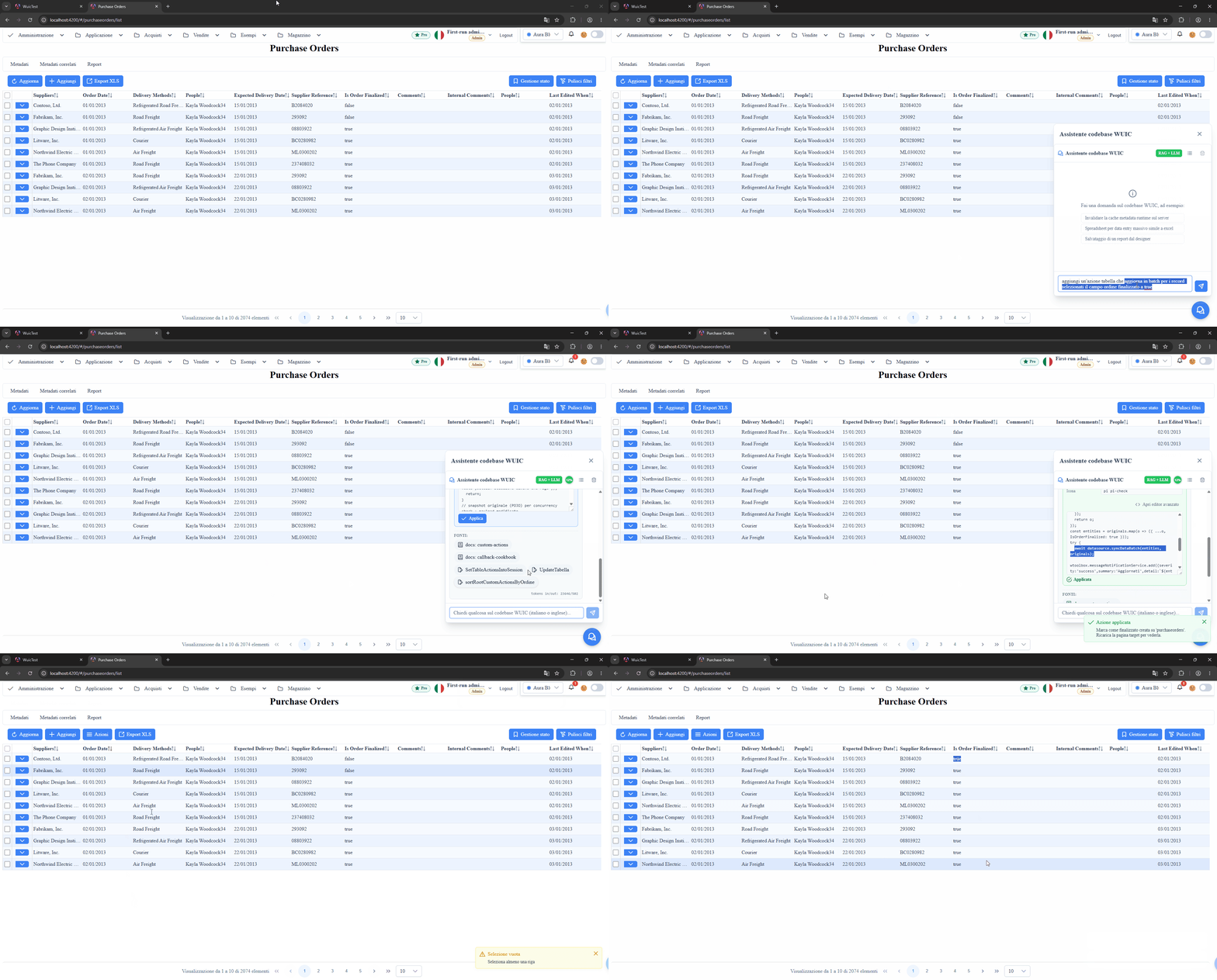
toolbar_action | Adds a button to the list-grid toolbar | _mtdt__cstom__actions__tabelle |
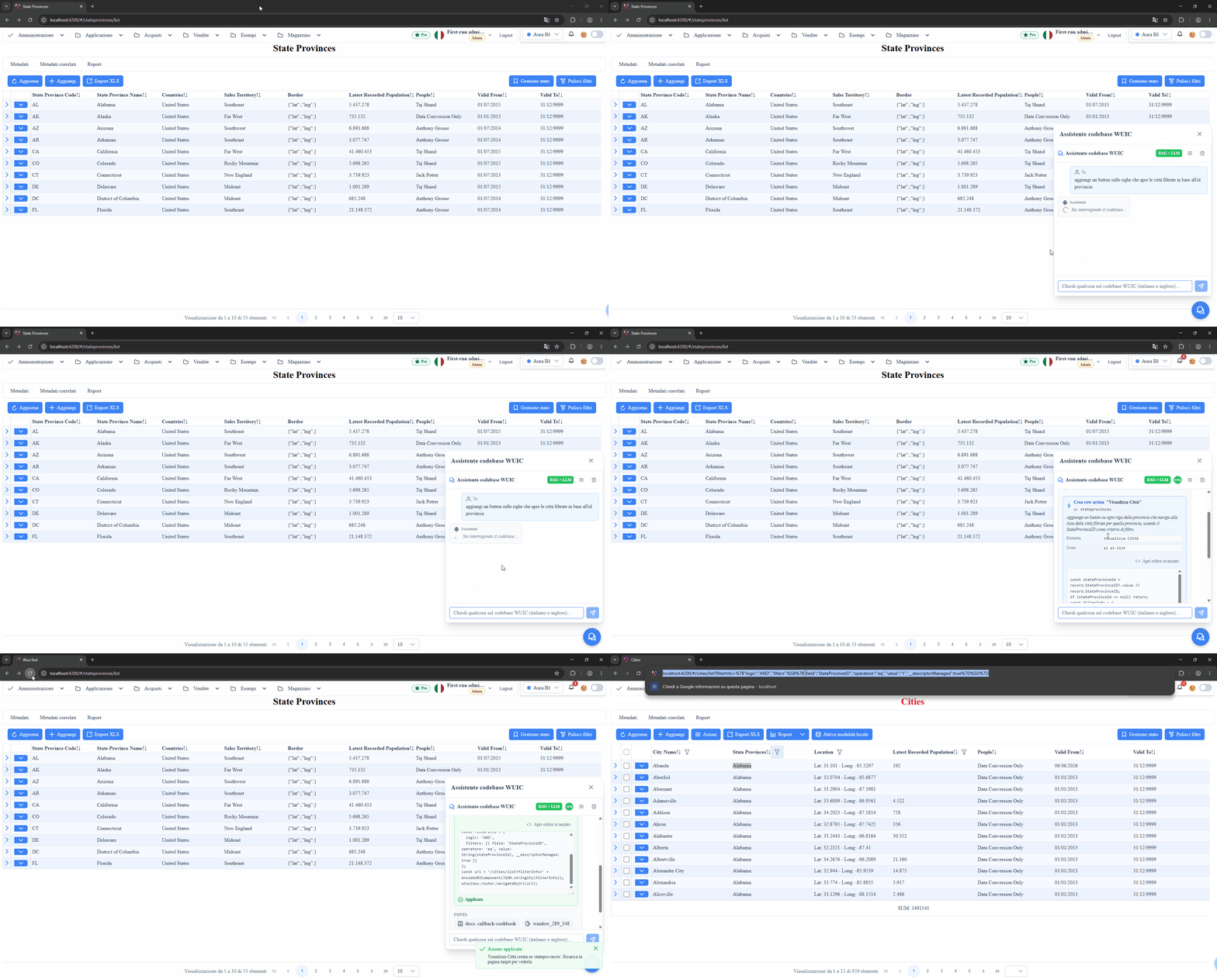
row_action | Adds a button-action on the single row | _metadati__colonne (mc_voa_class=6) |
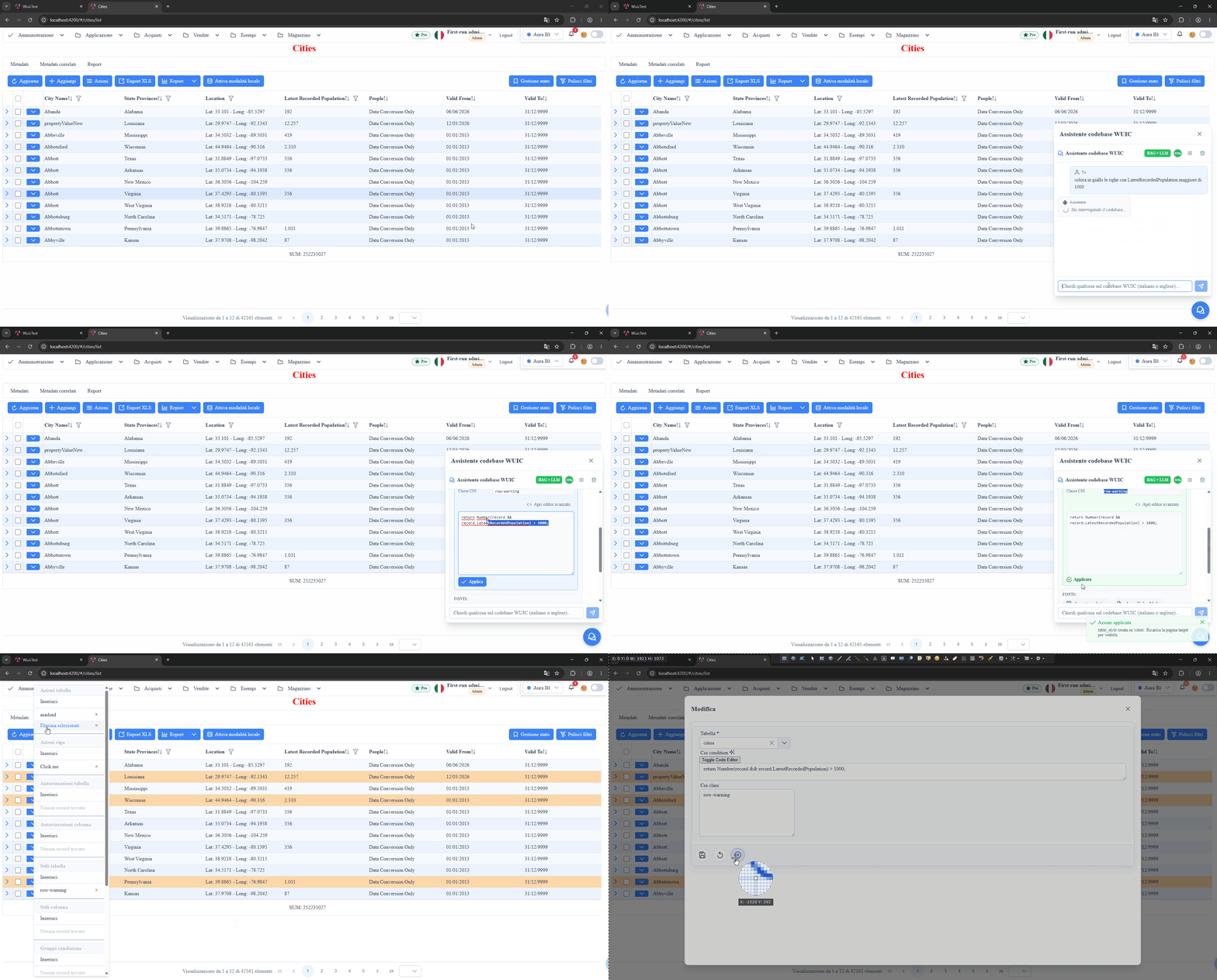
table_style | Conditional style (CSS class or inline) on the whole <tr> | _metadati__u_i__stili__tabelle |
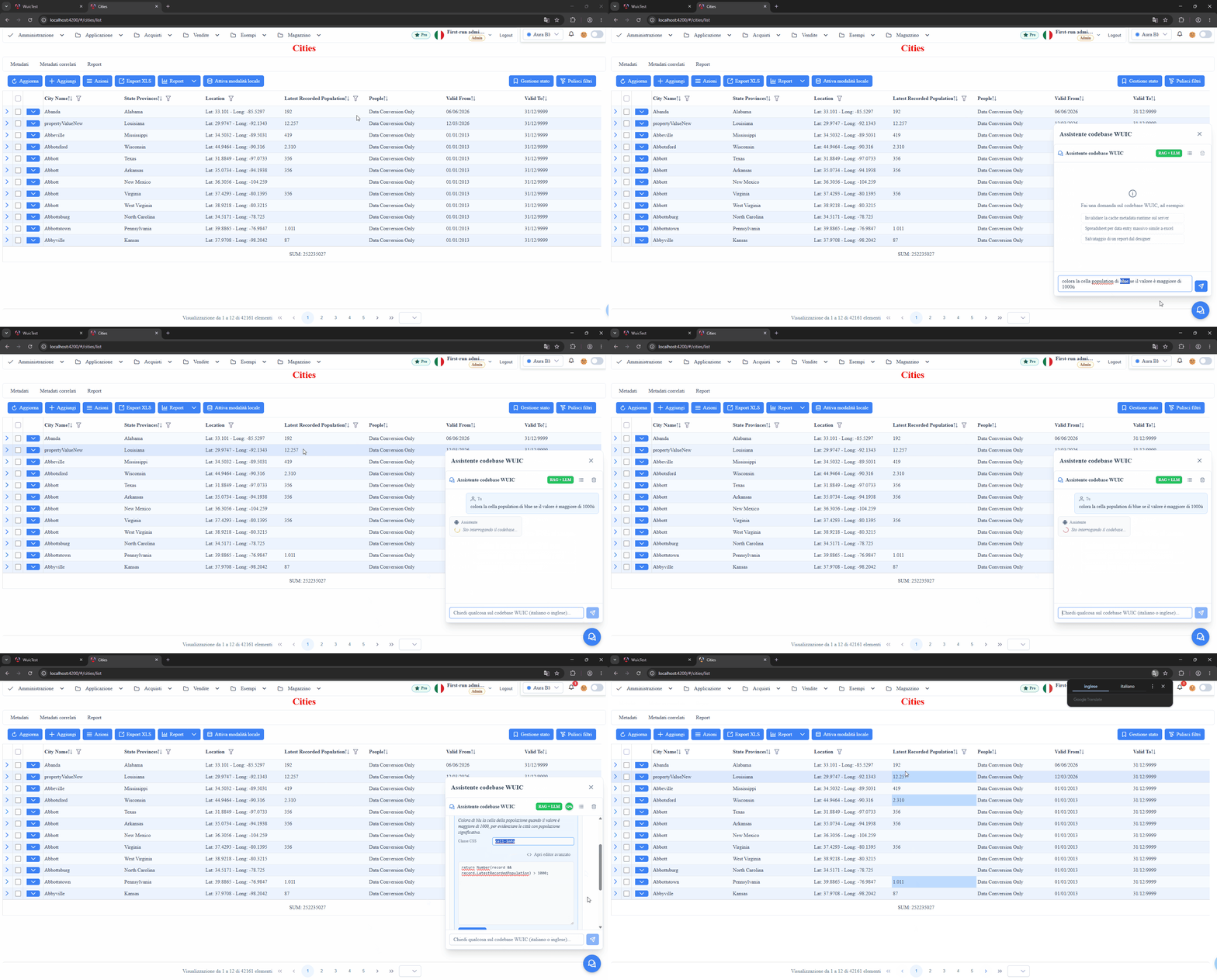
column_style | Conditional style on the single cell | _metadati__u_i__stili__colonne |
display_formula | Angular template for the cell (compact format, badge, link) | _metadati__colonne.mc_ui_grid_column_data_template |
form_title_formula | Dynamic title for the edit form | _metadati__tabelle.md_display_formula |
default_value_callback | JS default for a field on INSERT | _metadati__colonne.mc_default_value_callback |
custom_validation | Blocking pre-save validation | _metadati__colonne.mc_validation_custom_callback |
selection_changed | Trigger on lookup change | _metadati__colonne.mc_selection_changed_custom_function |
lifecycle_callback | before_save / after_save / after_load hooks | _metadati__tabelle.md_before_save (et al) |
simple_metadata_update | Generic update of a simple field (label, pagesize, flag) | _metadati__tabelle / _metadati__colonne |
metadata_column_create | Creates a new metadata column (computed allowed) | _metadati__colonne (INSERT) |
sql_metadata_field | Writes a SQL snippet on a gated metadata table field (super-admin) | _metadati__tabelle.md_join_override et al |
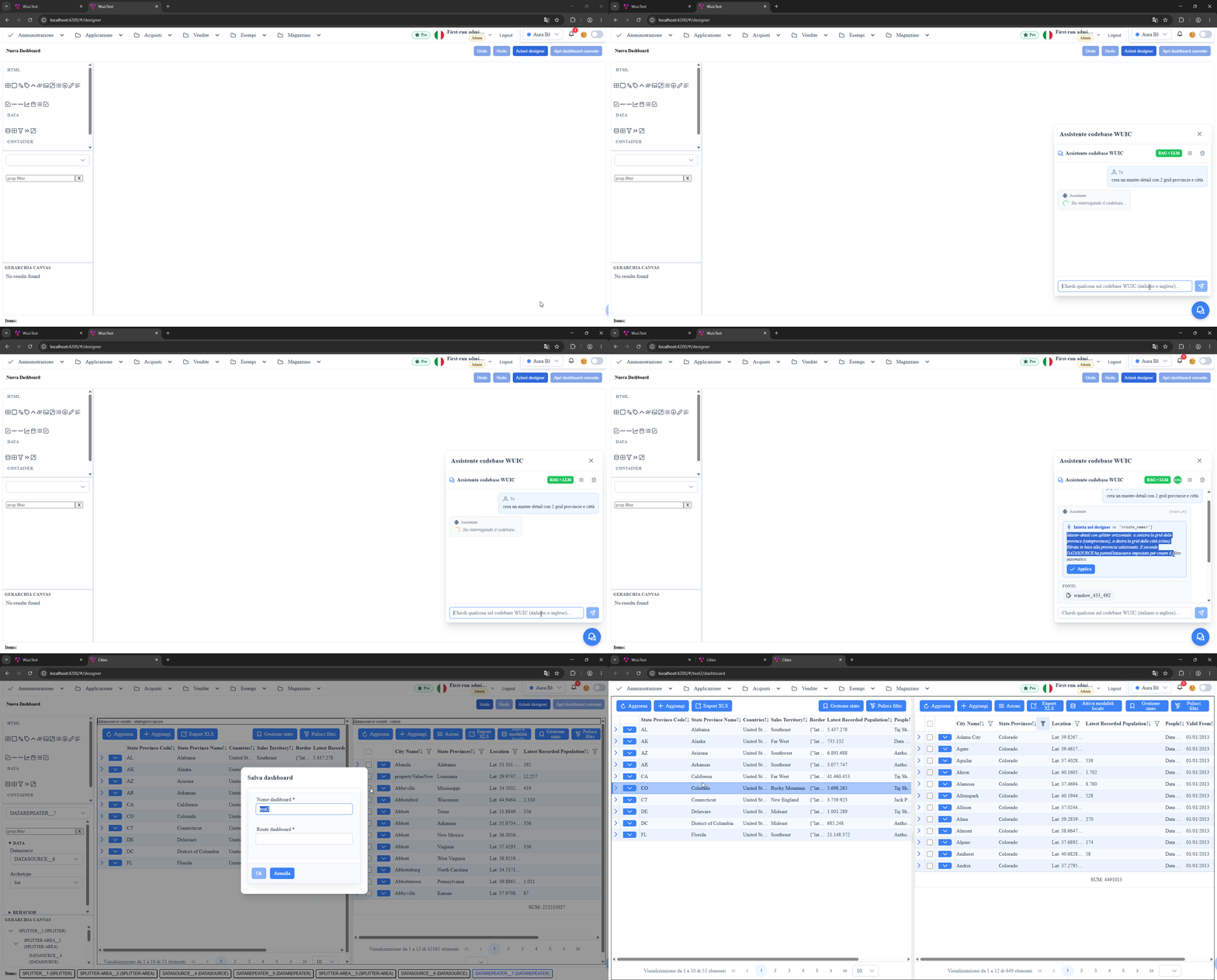
designer_inject | Injects tool/widget on the dashboard designer canvas (client-only, no backend) | dashboard designer state |
menu_entry | Adds a menu entry that opens a route (idempotent INSERT) | _metadati__menu |
suggest_callback | Suggest/autocomplete button (sparkles) on a column's FieldEditor | _metadati__colonne.mcsuggestvaluecallback |
workflow_inject | Injects/edits nodes and connections on the workflow designer canvas (client-only) | workflow designer state |
scene3d_inject | Injects/edits objects in the three.js 3D scene (client-only) | scene3d designer state |
pivot_inject | Builds the view (tables/joins) and the pivot configuration (client-only) | pivot-builder state |
report_inject | Generates a report from a template by describing it in words | new .mrt file (server) |
appsettings_inject | Stages changes to the application settings (client-only) | appsettings editor state |
db_table_create | Creates a new table on the Data DB and registers it in the metadata | physical table + _metadati__tabelle |
metadata_scaffold_table | Imports an existing physical table into the metadata (idempotent) | _metadati__tabelle / __colonne |
metadata_scaffold_view | Imports an existing SQL view into the metadata | _metadati__tabelle / __colonne |
metadata_scaffold_column | Maps a physical column that is not mapped yet | _metadati__colonne |
menu_entry_move | Moves/reorders an existing menu entry | _metadati__menu |
metadata_column_delete | Removes a column: physical DROP + metadata DELETE | _metadati__colonne (DELETE) |
menu_entry_delete | Removes a menu entry | _metadati__menu (DELETE) |
Canonical prompt examples
toolbar_action — Bulk button on the toolbar
User prompt:
> Su cities aggiungi un'azione di toolbar 'Archivia selezionate' (icona pi pi-archive) che archivia in bulk i record selezionati via POST /api/cities/bulk-archive con i loro id. Richiedi conferma prima.
Required fields in the proposal: route, label, callback_js. Optional
requires_multi_selection:true if the callback operates on
datasource.getSelectedRows() (the backend enables md_multiple_selection on the
route in that case).
row_action — Button on the single row
User prompt:
> Su cities aggiungi un button di riga 'Genera PDF' (icona pi pi-file-pdf) che apre /api/cities/{id}/pdf in nuova tab con l'id della riga.
Required: route, label, callback_js. The callback scope has record
(BehaviorSubject map: record.id?.value).
table_style — Conditional row style
User prompt:
> Su cities colora in rosso (classe row-danger) le righe con LatestRecordedPopulation inferiore a 1000.
Scope of condition_js: the record variable is the grid row, a flat object —
record.LatestRecordedPopulation is 192, record.deleted is true/false. The same
applies to column_style. This differs from form callbacks (default value, validation,
selection changed), where fields are BehaviorSubjects read via .value and written via
.next(...).
Required: route, css_class, condition_js. For predefined palette colors use
a class (row-danger / row-warning / row-info / row-success). For arbitrary
colors emit css_class with style: prefix (e.g.
style:background-color:#9b59b6;color:white) — the framework automatically injects
!important and neutralizes the <td> bg so the color reaches the eye.
column_style — Conditional cell style
User prompt:
> Su cities colora di rosso SOLO la cella LatestRecordedPopulation (classe cell-danger) quando il valore e' inferiore a 1000, NON l'intera riga.
Required: route, column_name, css_class, condition_js.
display_formula — Cell template
User prompt:
> Su cities, formatta la colonna LatestRecordedPopulation in formato compatto k/M (es. 12500 -> 12.5k, 1500000 -> 1.5M).
Required: route, column_name, template_html. Scope: rowData (flat object,
NO BehaviorSubject). Supports standard Angular pipes (number:'1.1-1', date:,
currency:, etc.), interpolation {{ rowData.x }}, inline ternary, *ngIf.
form_title_formula — Dynamic edit form title
User prompt:
> Su cities imposta il titolo dinamico del form di edit a 'Modifica <CityName>' dove <CityName> e' il nome della citta', oppure 'Nuova citta' su INSERT.
Required: route, formula_js. Scope: metaInfo, record, datasource,
wtoolbox. Must return string.
default_value_callback — Default on INSERT
User prompt:
> Su cities, la colonna CityName deve avere come valore di default in inserimento la stringa 'Nuova citta'.
Required: route, column_name, callback_js. The callback scope has record
(NEW record, plain object), field (target MetadatiColonna), metaInfo,
wtoolbox. The return is ignored — the callback MUST write the value into
record[field.mc_nome_colonna].
custom_validation — Blocking validation
User prompt:
> Su cities valida che LatestRecordedPopulation non sia negativo. Blocca il save con messaggio 'La popolazione non puo essere negativa'.
Required: route, column_name, callback_js. Scope: record (BehaviorSubject
map), field, vr (ValidationRule: set vr.message='...'), wtoolbox. Must
return boolean: true if valid, false to block.
selection_changed — Trigger on lookup change
User prompt:
> Su cities, al cambio del campo StateProvinceID (selection_changed), normalizza il valore tutto in maiuscolo via record.StateProvinceID.next(...).
Required: route, column_name, callback_js. Scope: record, value,
datasource, wtoolbox. The resolved lookup object is in
record.<col>__lookup_obj.value.
lifecycle_callback — Before/after save/load hooks
User prompt:
> Su cities, prima del save (event=before_save) metti il campo CityName in maiuscolo via record.CityName.next(record.CityName.value.toUpperCase()).
Required: route, event (before_save / after_save / after_load),
callback_js. Scope: record (BehaviorSubject map), datasource, wtoolbox.
simple_metadata_update — Update of simple fields
User prompt (example A — column label):
> Modifica il titolo della colonna LatestRecordedPopulation in 'Official Population' su cities.
User prompt (example B — table pagesize):
> Imposta il pagesize della tabella cities a 50.
Required: route, target (column / table), field_label (friendly label),
value. The backend maps the field_label to the physical SQL field via a
server-side map (around 29 fields covered: header label, page size, hide-in-list,
etc.).
metadata_column_create — Create metadata column
User prompt:
> Su cities crea una colonna calcolata e2e_total_chars di tipo number che calcola LEN sul CityName. La formula a livello metadato deve essere LEN([Application].[Cities].[CityName]) e la colonna deve essere is_computed=true (non fisica nel DB).
Required: route, column_name, ui_column_type, is_computed. When
is_computed=true also computed_formula must be present.
sql_metadata_field — SQL snippet on gated field (super-admin)
User prompt:
> Su cities applica al campo md_join_override il join SQL: LEFT JOIN [Application].[People] AS [e2e_test_people] ON 1=0. E' un test e2e no-op, scopo di verificare che il tool propose_sql_metadata_field scriva correttamente in _metadati__tabelle.mdjoinoverride. Dbms target: mssql.
Required: target_table, target_row_key, field_name, sql_snippet,
dbms_target. Auth: super-admin (D3 gate). The user prompt MUST specify the
target dbms — the backend doesn't infer it.
designer_inject — Tool injection in dashboard designer
Client-only kind: applied not by the backend but by a handler registered by the
designer.component via ChatbotHostRegistryService. See
docs/pages/_internal/designer-tool-catalog.md for the tool palette catalog.
menu_entry — Menu entry
User prompt:
> Add a menu entry 'Deadlines' that opens the cities route.
Required fields: route, label (optional icon, tooltip, parent_id). The
framework persists into _metadati__menu with an idempotent INSERT (no
duplicate when an entry with the same uri+label already exists); md_id (from the
route), mm_id and mmordine (appended last) are computed by the backend — the
model only passes route + label.
suggest_callback — Suggest/autocomplete on a field
User prompt:
> On the CityName field of cities add a suggest that proposes the uppercased name.
Required fields: route, column_name, callback_js. Adds the "suggest" button
(sparkles icon) next to the column's FieldEditor: on click it runs the callback to
propose/fill a value. The column MUST exist: when the mentioned field is not among
the real columns the model asks a clarification (never silently substitutes another
column). SQL field: _metadati__colonne.mcsuggestvaluecallback.
workflow_inject — Injection in the workflow designer
User prompt:
> Add a condition node to the workflow.
Client-only kind (like designer_inject): on the /workflow-designer page the
apply acts on the canvas state (handler
workflow-designer.component.onChatbotProposedWorkflowAction); persistence only
happens on "Save graph". Six action_types: inject (default — adds nodes[]
and connections[], can build a whole skeleton in one shot), plus the edit
actions (connect/disconnect, insert-between, set-prop, remove). See
workflow-designer for the node types.
scene3d_inject — Injection in the 3D scene
User prompt:
> Add a red cube and a blue sphere to the scene.
Client-only kind: on the /scene3d_designer page (three.js editor) it supports 3
action_types: inject (adds objects — many at once too: "create a scene with a
plane, a directional light and 3 spheres", data-bound mesh-repeaters as 3D bar
charts or 3D kanban), plus set-prop and remove on existing objects
(target_name, prop_name, value). Fills objects[] for inject.
Quiet tools — no "Apply" card
Three tools never produce a proposal; they shape the conversation instead:
remember_fact/forget_fact— pin/remove high-priority facts ("this project
uses snake_case columns") that survive history summarization.
suggest_followups— the clickable chips under each answer proposing the next
question.
Routing robustness — non-trivial variants
The canonical prompts above are a single example per kind. Tool routing is
nonetheless robust to different phrasings: the suite
playwright/docs/rag-chatbot/rag-chatbot--tools-variations.mjs tries **5+ variants
per kind** (semantic rewordings, realistic constraints, disambiguating pairs), many
derived from real prompts, and measures the routing-rate over multiple repetitions.
Routing turned out to be language-agnostic (Italian and English route the same
way — WUIC_RAG_VAR_LANG=en).
Alternative examples that route correctly (besides the canonical ones):
toolbar_action→ «put a button at the top of the grid that exports the checked rows to CSV»row_action→ «on each row an eye icon that opens the detail of that row in a new tab»table_style→ «highlight in green the recently modified rows»column_style→ «put a yellow background only on the CityName cell when it is empty»display_formula→ «display the population with the thousands separator»custom_validation→ «prevent saving if ValidTo is earlier than ValidFrom»simple_metadata_update→ «hide the LastEditedBy column from the list» (note: a «default filter» issimple_metadata_updatewithfield_label=default_filter, NOTsql_metadata_field)metadata_column_create→ «add a computed column that divides the population by 1000»designer_inject→ «create a master-detail with 2 grids (provinces and cities)», «compose a 3-column layout with three grids», «put two grids side by side»
True negatives (must NOT emit a tool): requests for a code example
(«give me an example of a toolbar action without applying it?») or conceptual questions
stay as a text answer without proposing any action.
Designer — canvas verification and palette limits
rag-chatbot--designer-canvas-verify.mjs checks that each designer prompt actually
produces the expected components in the canvas (histogram by type, not just DOM
presence). Charts are produced with a DATAREPEATER in action: "chart" mode
(there is no separate CHART tool — a chart is a datarepeater in chart mode,
configurable bar/line/pie via «Configura chart»). Other datarepeater actions:
list (grid, default), edit/dialog/detail (record/form), map, scheduler,
calendar, kanban, tree, carousel, pivot, spreadsheet. Text titles are
emitted as LABEL/H1.
#### Inline archetype config (archetype_config)
A designer_inject DATAREPEATER node can carry an archetype_config field = the
content of md_props_bag.archetypes.<action>. It is applied in-memory to the bound
datasource's metaInfo.tableMetadata (no server call) via the **same path as the chart
configurator** (customProps_<action> + ds.fetchData() + propertyTreeBuilder), and
persists when the datasource is serialized on dashboard save. The apply is deferred
until the bound datasource is materialized.
- chart:
dataOptionsMUST includedataProperty:"dato"(the key of the data array
that parseData reads — without it the chart stays empty) +
datasets:[{label, labelField:'<labels col>', dataField:'<values col>'}].
- map:
markerColorField,titleField,zoom,center:{lat,lng}(markers take
their coordinates from the route's auto-detected point column).
- Other archetypes (
scheduler,kanban,tree, …) follow the same mechanism with
their respective fields (see mapOptions/kanbanOptions/schedulerOptions).
Verified: «pie chart of population by province» → pie with data; «cities on a map
colored by province» → Google Map with one marker per city.
> ⚠️ Designer full-UI test: each prompt must run on a clean conversation (the
> chatbot persists the session id in localStorage['wuic_rag_last_session_id'] and
> restores it on boot — without reset, one prompt's history contaminates the next).
> It also requires the backend in ASPNETCORE_ENVIRONMENT=Development (CORS for the
> dev frontend) + the frontend running.
Lookup columns — matching on the real value (ID)
For a request like "color the row if <lookup column> = <displayed value>"
(e.g. on cities, "province = Virginia") the REAL value in the record of JS callbacks is
the ID in record.<column> (e.g. record.StateProvinceID), not the string shown in
the cell nor the SQL join alias. So the model:
1. resolves the displayed value to its ID by querying the lookup table (not the rows
currently loaded in the grid) via
request_metadata_detail{detail:'lookup_value', route:'<route>', column:'<col>', value:'<value>'};
2. generates the condition_js comparing the ID:
return Number(record.StateProvinceID?.value ?? record.StateProvinceID) === 49;request_metadata_detail is not a tool registered in rag_tools.json: it is driven by the
system prompt and re-read from the response text. The detail:'lookup_value' is resolved
server-side by RagController.ResolveLookupValueDetail (DATA connection, not metadata) and
returns matched_ids. If the value does not exist, the model issues a clarification
without inventing an ID (never compare the displayed string nor the SQL join alias, which does
not exist in the JS record).
Regression test: rag-chatbot--lookup-value.mjs (subtests resolve + no-match).
Operational pattern
1. The user opens the chatbot (FAB bottom right) and writes the prompt.
2. The LLM analyzes the request + the injected routeContext (current route,
table, columns) and emits the tool_use with the appropriate kind.
3. The proposal is shown in a card with editable fields:
- NON-body fields (class, label, target, etc.) as <input> text.
- The callback body as <textarea> or advanced Monaco editor.
4. The user can edit both before clicking "Apply".
5. On click "Apply":
- If the proposal has been edited: POST /api/Rag/UpdateProposedAction rewrites
the proposed_action_json in the message DB row.
- POST /api/Rag/ApplyAction reads the proposal back from DB and applies the
side-effects on WUIC metadata + calls
InvalidateMetadataCachesAndSetVersion so the next refresh of the target
route sees the change.
Docs-driven tests
The playwright/docs/rag-chatbot/rag-chatbot--tools-end-to-end.mjs file defines
the TOOLS array with one entry per kind. Each entry has:
kind— value expected inproposed_action_json;prompt— exact text sent to the LLM;assertFields— minimum fields the proposal must contain;verify(api, mdId)— DB post-apply check (metadata row exists);verifyDom(page)— runtime check (visible effect in/cities/list);cleanup(api, mdId)— surgical rollback (DELETE / UPDATE NULL).
To rerun only some kinds: WUIC_RAG_TOOLS_ONLY=row_action,table_style npm run test:docs.
Contextual pages beyond the designers
Besides /designer, /workflow-designer and /scene3d_designer, the assistant
is contextual on these pages too. Each one registers a handler and a state
provider in ChatbotHostRegistryService: the page context is injected into the
prompt and the apply acts on the component state.
> NB: the sections below use "Example request" and not the
> **User prompt:** marker. The canonical prompts extracted from that marker
> must have a matching entry in rag-chatbot--tools-end-to-end.mjs (backend-side
> suite): these kinds are covered by dedicated suites instead.
pivot_inject — pivot view and configuration
Page: <route>/pivot-builder. CLIENT-ONLY kind: the apply mutates the component
state, persistence still happens on "Save Configuration" / "Create View".
Example request: *"join orders and customers on customer_id and sum the total by
month"* → a single action_type: 'inject' proposal with tables[] + joins[].
Watch out for the ambiguity: on this page "add column X" means putting it on a
pivot axis, not creating a SQL column (metadata_column_create). The
disambiguation note injected into the prompt covers this case explicitly.
report_inject — report generation
Page: <route>/report-designer. Unlike the other *_inject kinds, the apply
writes an .mrt file immediately on the server, reusing the framework
scaffolder; the name is timestamped and the open report is not overwritten.
Example request: "make a report grouped by state with the population total" →
template: 'crossgroup'.
Templates: bands | crosstab | crossgroup. Aggregations: Sum, Avg,
Count, Min, Max. The columns used for value/totals must be numeric.
appsettings_inject — application settings
Page: /appsettings-editor. The apply stages the changes (they show up as
"pending changes"); saving stays an explicit user action.
Example request: "raise the query timeout to 120 seconds".
Two limits enforced client-side:
- reserved keys (connection strings, credentials, API keys, license) are
masked in the dump sent to the model — that dump travels to the configured
LLM provider on every message;
- the same keys, plus
dbmsandfirstRun, are on a write denylist: a wrong
value would not be a preference to correct but a backend that fails to start.
Scaffolding from the chat
The scaffolding page is a metadata-generated route with no Angular host
component: these kinds are therefore applied by the backend.
The introspection needed to compose the proposals goes through
request_metadata_detail with the details db_connections, db_databases,
db_tables, db_columns, menu_tree — not through propose_* tools, because
a read must not produce an "Apply action" box. The connection list only exposes
the logical names: connection strings are filtered out.
| Kind | Example request |
|---|---|
db_table_create | "create the supplier_orders table" |
metadata_scaffold_table | "add the existing Sales.Invoices table to the application" |
metadata_scaffold_view | "import the vw_monthly_revenue view" |
metadata_scaffold_column | "map the DueDate column I added to the database" |
menu_entry_move | "move Invoices under Administration" |
Known limits, also stated in the tool descriptions:
- table creation works on SQL Server, MySQL, PostgreSQL and Oracle (DDL in
the engine's dialect); when it does not complete, the proposal is rejected with
an explicit message, instead of succeeding with no effect;
- the import is idempotent: running it again only adds the new columns, and
it is the correct way to realign a route after an external ALTER TABLE or to
recover a creation that stopped halfway;
scaffoldDB(importing a whole database),scaffoldStoredandfixFKeysare
not exposed: a single confirmation with an unbounded blast radius.
Operations that remove data
metadata_column_delete and menu_entry_delete are irreversible: the first
one performs a DROP of the physical column.
The confirmation is verified by the server, not by the UI: ApplyAction and
ApplyActionDirect require a confirmToken equal to the object name (column or
menu label), otherwise they answer 400 confirmation-required. The check lives
on the server because ApplyActionDirect is the channel for agentic clients and
has no UI. In the chat the user has to retype that name in a dedicated dialog.
Additional guards in the executors:
- a primary key column cannot be removed;
- on SQL Server, if the metadata name and the physical one diverge the removal is
rejected (the DROP would use the wrong name);
- the menu label in the proposal is compared with the current one: identifiers
can be reassigned, so a stale proposal must not be able to delete the wrong
entry.
References
- Backend dispatcher:
POST /api/Rag/ApplyAction - Callback cookbook: Callback cookbook
- Main page: RAG Chatbot
Screenshot