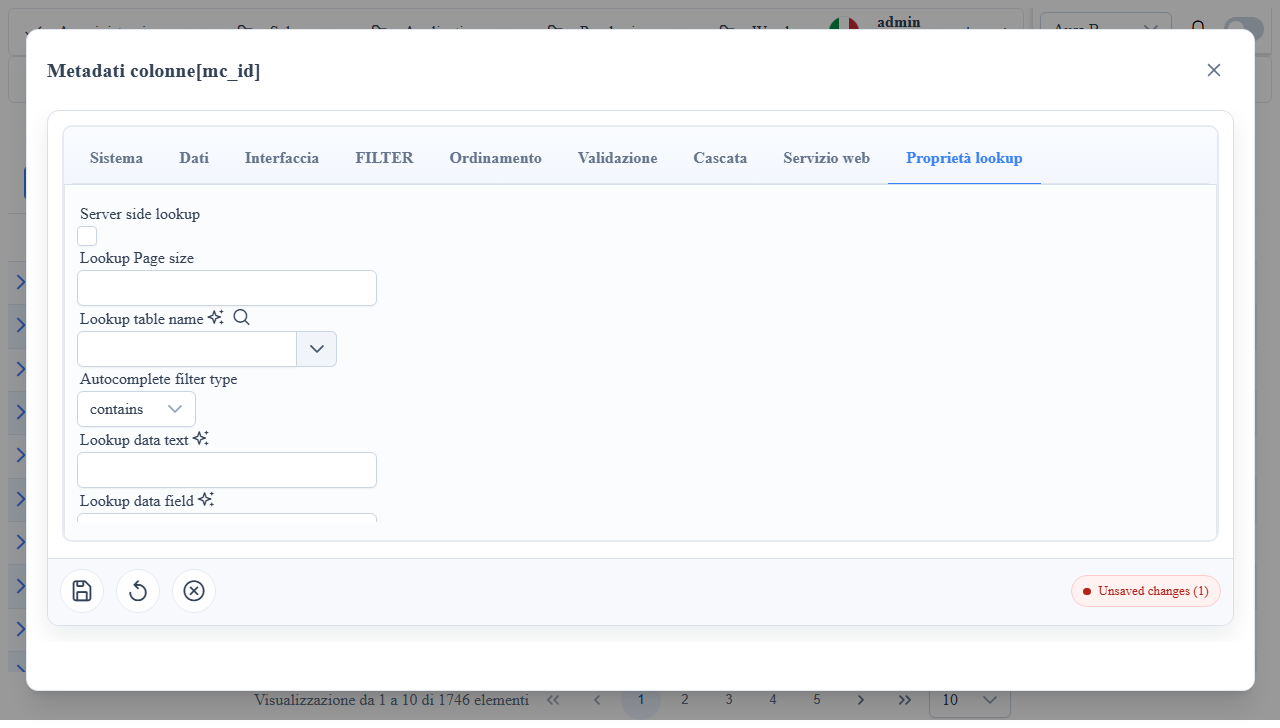
Overview
Widget Lookup
Column widget for relationships (lookupByID, multiple_check) with a dedicated Lookup tab in the column metadata-editor.
Examples
- Pattern 3c — pure-OData lookup (State/Province from `/odata/Stateprovinces`) — demonstrates
mc_props_bag.lookup.endpointwith theodataprovider and inline rendering via$expand.
When to Use It
- Selecting related records from an external metadata table.
- Scenarios with server-side lookup search and paging.
- Support for single selection (
lookupByID) and multi-selection (multiple_check).
Column Metadata Properties (Lookup tab)
mc_ui_lookup_entity_name: lookup data source metadata route.mc_ui_lookup_dataValueField: returned ID field.mc_ui_lookup_dataTextField: displayed description field.mc_ui_lookup_computed_dataTextField: SQL expression for the displayed text (overridesmc_ui_lookup_dataTextField). References the related table fields via the join alias<column>_<entity>, e.g.UPPER([StateProvinceID_stateprovinces].[StateProvinceName]). Via the chatbot the alias is obtained withrequest_metadata_detail{detail:'lookup_columns'}.mc_ui_lookup_filter: base lookup filter.mc_serverside_operations: server-side search/paging.mc_ui_pagesize: lookup result page size.mc_ui_lookup_edit_allow: enables lookup record edit from popup.mc_ui_lookup_insert_allow: enables lookup record insertion from popup.mc_ui_lookup_search_grid: enables search grid in the popup.mc_logic_allow_navigation: navigation to linked route.
Useful mc_props_bag
{
  "lookup": {
    "filter": {
      "logic": "AND",
      "filters": [
        { "field": "is_active", "operatore": "eq", "value": true }
      ]
lookup.filter: additional constraint on the client/server side in the lookup query.lookup.virtualize: enables virtual scroll on the lookup widget'sp-autocomplete.lookup.virtualize.enabled: tolerant parser (true/false,1/0, equivalent strings); defaultfalsewhen absent.lookup.virtualize.itemSize: virtual row height in px; default44.lookup.endpoint: override of the dropdown's data provider. When set, the lookup-editor's nested datasource no longer goes through the metadata combo endpoint (MetaService.getFlatRecordComboData) but directly through the provider declared intypewith the URL inuri.lookup.endpoint.type:'odata'(dispatcher routes toDataProviderOdataService.selectCombowhich issues a GET with$top,$count=true,$select=valueField,textFieldand$filter=contains(textField,'<query>')for server-side search). Other values follow the same logic as table-levelextraProps.endpoint.type.lookup.endpoint.uri: base URL of the entity set (e.g.,/odata/<EntitySet>), with or without explicit origin. Existing query params are ignored — the provider rebuilds the params on each fetch.form.columns: field width in the edit form.style.editCss: custom editor style.
Slim combo — extra fields via mc_props_bag.slimCombo
The lookup dropdown by default issues a minimal SELECT on the related table: PK + mc_ui_lookup_dataValueField + mc_ui_lookup_dataTextField. This shrinks the combo payload. When the client needs additional columns from the related table — typically to pre-fill dependent fields via mc_selection_changed_custom_function__fn — use mc_props_bag.slimCombo as an array of extra column names to include in the combo SELECT:
{
  "slimCombo": ["unita_misura_id","codice_iva_id","prezzo_vendita","sconto_default"]
}- Array: the names are added to the
columnRestrictionListof the combo response (logic inDataProviderMetaService.buildSlimComboRestriction). slimCombo: false: disables the restriction → the combo returns all columns. Useful for debugging, larger payload.- If the column has
mc_ui_lookup_combo_text_edit_computed_dataTextFieldset (computed display formula),slimCombois ignored and the combo returns all columns (the formula may reference arbitrary fields).
The extra fields land in record['<col>__lookup_obj'].value (full record from the related table, already including the fields declared in slimCombo) and are accessible from the mc_selection_changed_custom_function__fn callback:
prodCol.mc_selection_changed_custom_function__fn = (record, _f, _m, newValue) => {
  const prod = record['prodotto_id__lookup_obj']?.value;
  if (!prod) return;
  record['descrizione']?.next(prod.descrizione);
  record['prezzo_unitario']?.next(prod.prezzo_vendita);
  record['unita_misura_id']?.next(prod.unita_misura_id);
  record['codice_iva_id']?.next(prod.codice_iva_id);
Tradeoff: slightly larger combo payload but no extra HTTP roundtrip (getFlatRecordData to fetch the full record by id) on every selection.
Assisted Workflow: Clone Lookup + Default Filter + Lookup Hierarchy
- Inline operational flow:
suggestLookup2 -> suggestLookupDefaultFilter -> getLookupListByRoute -> getSeletClauseByLookupHierarchy. - Inline snippet main fields:
mc_ui_lookup_entity_name,mc_ui_lookup_dataValueField,mc_ui_lookup_dataTextField,mc_ui_lookup_filter. - Inline snippet quick filter:
lookup.filter: {"logic":"AND","filters":[{"field":"is_active","operatore":"eq","value":true}]}. - Client effect: accelerated lookup setup in the metadata-editor and consistent filter already ready in the widget.
- Server effect: lookup query and select clause remain aligned with
MetaService.*endpoints without manual mapping.
Quick operational checklist:
1. Clone base configuration with suggestLookup2;
2. Generate default filter with suggestLookupDefaultFilter;
3. Refine hierarchy/select clause from the lookup tree;
4. Validate at runtime that search and value/text mapping are consistent.
Client/Server Effects
- Client: lookup widget rendering, search, label/value binding.
- Client: with
lookup.virtualizeactive, the autocomplete renders only the visual subset of options. - Server: paginated/filtered lookup query via
MetaService.getFlatRecordData.
Operational Notes
- In
multiple_check, the lookup part remains the same; the multi-value renderer changes. - If
mc_ui_lookup_entity_nameis missing, the widget cannot resolve the source.
Auto-fetch on programmatic FK changes
The wuic-lookup-editor automatically subscribes to record[mc_nome_colonna] BehaviorSubject and handles programmatic FK changes (e.g. import from source document, custom callback that does record.cliente_id.next(99)):
- If the new value is already in `items` (the loaded lookup page): only
__lookup_objis updated for consistency, no HTTP call. - If the new value is not in items (e.g. value outside current combo page, or not yet fetched): a second-stage fetch is triggered, filtered
WHERE <valueField> eqor <newValue>, to retrieve the related record and automatically populate the dropdown.
Skip cases (no-op):
- Multi-value lookup (
isFilterwitheqor,multiple_check) - First emit of the BS (already covered by the init flow)
- null/undefined value (user cleared)
hasActiveLookupQuery=true(user is typing a manual query)
Implication for custom forms: setting just the FK is enough — manual workarounds to populate __lookup_obj or the joined alias are no longer required. The dropdown display updates by itself.
// BEFORE (manual workaround required)
record.cliente_id.next(99);
record.cliente_id__lookup_obj.next({ id: 99, ragione_sociale: 'Acme S.r.l.' });
record['clienti___ragione_sociale__cliente_id'].next('Acme S.r.l.');

// NOW (auto-fetch by lookup-editor)
record.cliente_id.next(99);
> Note: auto-fetch fires only when the <wuic-lookup-editor> is mounted (cell in edit mode). For list display (read-only cell), formatGridViewValue reads the joined alias <route>___<textField>__<col> directly from the record — that still must be populated manually if it doesn't come from the backend.
Screenshot