The reporting story in most enterprise apps goes like this: build a stored procedure, expose it via a custom controller, write a TypeScript service to call it, embed a Stimulsoft (or Crystal, or Telerik) viewer, manually wire the parameters, manually handle the per-user filter, manually validate the permissions. Multiply by 40 reports. Each one is a tiny project.
The WUIC version: write a SQL view, scaffold it as a metadata route, lay the report out in the embedded designer (it saves into the route's folder for you), add a menu entry pointing at the route's report viewer. The framework picks it up. The same auth, per-user filtering, and column permissions that drive list pages apply to the report — for free, because it's the same route.
This post walks through the contract between the report, the route, and the viewer, and why naming discipline matters more here than anywhere else in the framework.
The example
Say you want a "Sales by Region" report that aggregates opportunities joined with accounts and groups by region. The SQL is straightforward:
CREATE VIEW vw_sales_by_region AS
SELECT
    a.region_code,
    a.region_name,
    COUNT(o.id)                  AS opportunity_count,
    SUM(o.amount)                AS total_amount,
    AVG(o.amount)                AS avg_deal_size,
    SUM(CASE WHEN o.stage = 'Won' THEN o.amount ELSE 0 END) AS won_amount
FROM dbo.opportunities o
INNER JOIN dbo.accounts a ON a.id = o.account_id
WHERE COALESCE(o.deleted, 0) = 0
GROUP BY a.region_code, a.region_name;
That's the data. Now the report.
Scaffold the view as a metadata route
The framework needs to know about the view in _metadati__tabelle so the runtime can resolve it, apply per-user column grants, and inject the user's filter context. Same tool as for tables: the built-in Scaffolding page. Its object dropdown lists tables, views (tagged [VISTA]) and stored procedures ([STORED]) — pick vw_sales_by_region, and this time leave "Create Menu" unticked, because we don't want the view to appear as its own list page; it's reachable through the report's own menu entry.
Scaffolding a view is the same click as scaffolding a table — the page detects it's a view and routes accordingly. It inserts a _metadati__tabelle row with mdroutename = 'vw_sales_by_region' and one _metadati__colonne row per column. (For automation it's the scaffolding.scaffoldView proxy method, sibling of scaffoldTable — but as with tables, the page is how you do it interactively.)
The columns are now metadata. The framework knows that total_amount is a decimal that should render with thousand separators, that region_name is a string used as the human-friendly group key, and that the view has 6 columns. None of that is in the report yet — it's in the metadata, and the report will read it.
Design the report against the route
You don't hand-write the .mrt XML. WUIC ships an embedded Stimulsoft report designer in the browser, at #/<route>/report-designer. When you open it for a scaffolded route, the backend seeds the report's data dictionary with that route's data source already wired up: the view's columns are sitting in the fields list, ready to drag onto the canvas. You lay out bands, drop fields, preview on real data — the designer writes the XML.
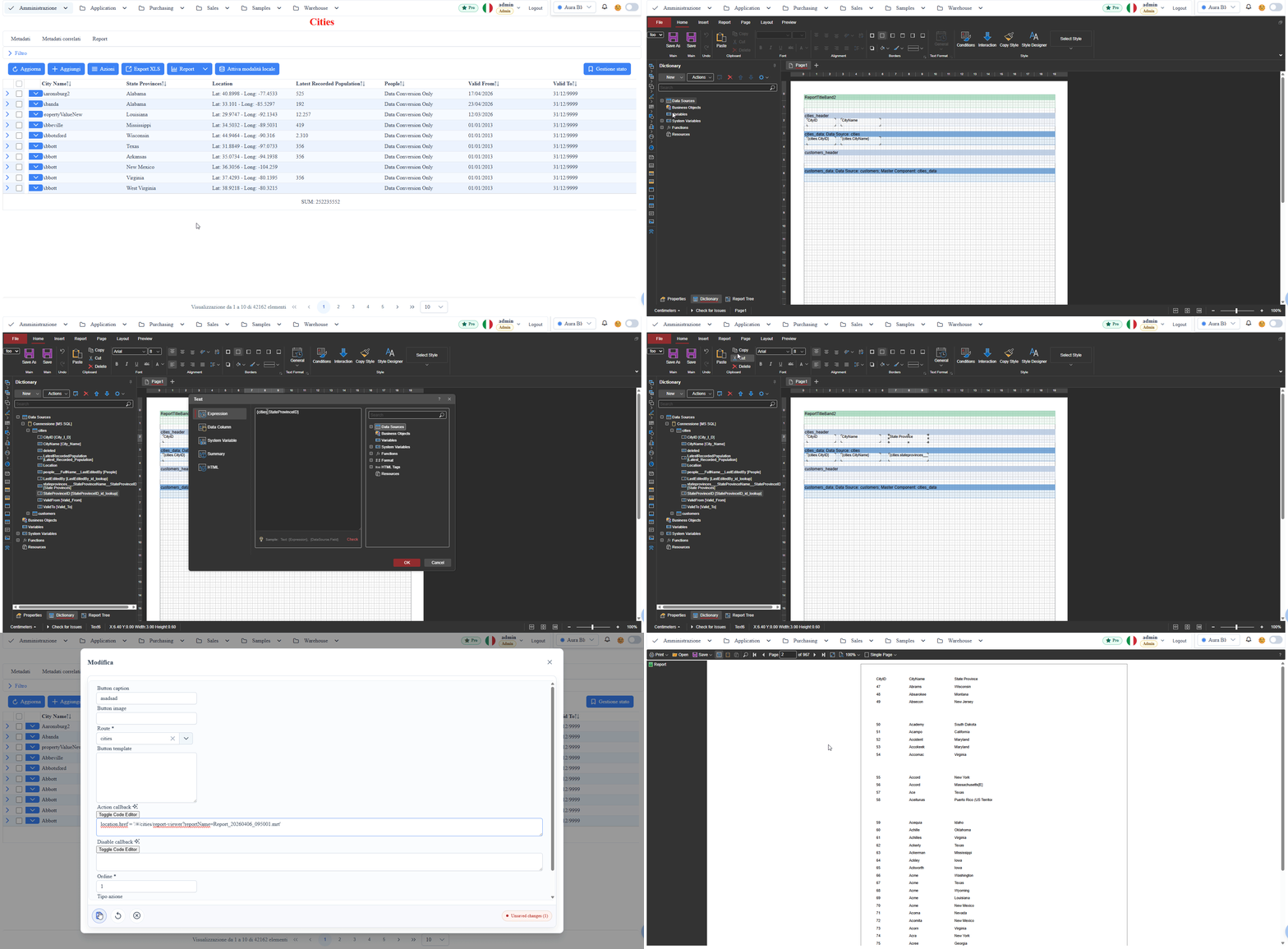
What it generates is worth understanding, because it's the contract the viewer relies on. The .mrt is XML, and the convention is that the SQL data source is named after the metadata route (spaces replaced by underscores):
<DataSources>
  <!-- StiSqlSource named after the route -->
  <vw_sales_by_region type="Stimulsoft.Report.Dictionary.StiSqlSource">
    <Name>vw_sales_by_region</Name>
    <Alias>vw_sales_by_region</Alias>
    <SqlCommand>SELECT 1 AS [__autogenerated], region_name, total_amount, ... FROM vw_sales_by_region</SqlCommand>
  </vw_sales_by_region>
</DataSources>
…and every binding expression in the report references {vw_sales_by_region.field_name} — again, filled in by the designer as you drag fields:
<Text>{vw_sales_by_region.region_name}</Text>
<Text>{vw_sales_by_region.total_amount}</Text>
The name match is a convention, not a hard wall: at render time the backend first looks up the data source by route name, then falls back to a case-insensitive match on name or alias, and finally — if the report has exactly one SQL source — uses that one. But rely on the convention; the fallbacks exist for legacy reports.
Note the 1 AS [__autogenerated] sentinel column. That's how the engine tells auto-generated queries apart from hand-written ones. If the sentinel is present (or the command is empty), the backend regenerates the query on every render from the current metadata and the current user — visible columns, lookup joins, user-scoped filters. If you've replaced the SQL with your own hand-written query, the sentinel is gone and the engine leaves your SQL alone.
You don't write a backend endpoint for the report. You don't write a TypeScript service. The report is a .mrt file in a folder, and the framework finds it, rebinds its connection to the route's database, and executes it with the caller's identity.
Where the .mrt goes on disk
Convention — in the project root of the app:
<App>/Reports/<route>/<filename>.mrt
For our example:
CrmApp/Reports/vw_sales_by_region/vw_sales_by_region.mrt
The <filename> is arbitrary — if you omit reportName the viewer defaults to Report.mrt. What matters is the folder is named after the route, because the viewer constructs the file path from it:
#/vw_sales_by_region/report-viewer?reportName=vw_sales_by_region.mrt
Drop that URL into a menu entry in _metadati__menu and it shows up in the navigation. Click it, the viewer opens, the report renders with live data.
Multiple .mrt files per route are supported — say summary.mrt and detailed.mrt for the same view, with the menu offering both as options. Each menu entry passes its own reportName=.
One backend prerequisite: AppSettings.reportQueryTimeout must exist in appsettings.json (e.g. "120"). The viewer parses it to set the SQL command timeout on every data source, and a missing value is a 500 at render time, not a graceful default.
What's reused from the rest of the framework
This is where the metadata-driven story pays off:
- Auth. The viewer endpoints run the same authentication the rest of the API uses. No separate report login. If the
.mrtdeclares auser_idvariable, it's set to the authenticated user at render — usable directly in hand-written SQL. - Filter context. For auto-generated queries, the backend rebuilds the SQL per render via the same query builder the list page uses, so user-scoped filters (e.g.
country_code IN (user's territory)) apply to the report automatically. Filters passed on the URL flow into the same rebuild. - Per-column grants. Column visibility is resolved per user and role — the same grant rules (
mc_grant_by_default, role/company grants) the list page applies. A column the user isn't granted never enters the generated query, so it never reaches Stimulsoft at all. Caveat: this applies to the auto-generated query. Hand-written SQL in the .mrt is preserved verbatim, which means it also bypasses the column gate — you own that trade-off. - i18n. The designer seeds field aliases from
_metadati__colonne.mc_display_string_in_view, and the viewer calls Stimulsoft's report localization with the app's current language at render time. Labels follow the language the user is already using in the rest of the app. - Caching. Stimulsoft's report and image cache are wired per route under
Reports/cache/<route>; the metadata snapshot is already in memory. On the demo dataset a report renders in about a second.
What you'd have rolled by hand in a custom controller — auth, filter context, per-column gate, i18n, caching — is the framework's default for every route.
A note on the dictionary
One detail worth calling out about that designer: the pre-populated dictionary includes the fields of every lookup the route declares, not just the view's own columns — so a foreign-key column shows up with its resolved display fields, ready to drop into the layout. If you add or remove metadata columns later, reopen the designer to regenerate the dictionary.
Saving from the designer publishes it: the .mrt lands in the route's folder automatically. There's no separate "register report" step — the folder structure IS the registration.
Naming discipline (a real warning)
We mentioned in the scaffolding post that naming discipline is the hardest thing about a metadata-driven framework, and reports are where it hurts the most.
Specifically:
- View names are stable contracts. A
.mrtfile referencesvw_sales_by_region.total_amount. Rename the view (or the column) and every report referencing it breaks. The framework can't auto-rewrite the .mrt for you; from its perspective the file is opaque XML. - Filename is part of the URL. A menu entry at
?reportName=sales-summary.mrtis bound to that filename. Renamesales-summary.mrttosummary.mrtand the menu entry breaks until you update it.
What the framework does to make these failures visible instead of mysterious:
- A missing or misnamed report file returns a typed error envelope (
errors.report.not_found, HTTP 404) carrying the route, the report name, and the path it looked at — localized in the UI instead of a raw stacktrace. - The client runs a lightweight preflight before mounting the Stimulsoft viewer, because the viewer itself crashes ungracefully on any non-200. If the file isn't there, you get a clean localized dialog and the viewer never mounts.
- The
__autogeneratedsentinel keeps the engine from clobbering hand-written SQL on re-render — the most common way a "working yesterday" report used to die.
What the report engine does NOT do
In the same spirit as our other posts on this framework — here's what's deliberately out:
- Cross-route reports as a first-class concept. A report is bound to one metadata route, but that doesn't mean it can only see one table. The auto-generated query already joins every lookup the route declares: if
opportunitieshasaccount_idas a lookup onaccounts, the account's display fields show up as draggable fields in the designer dictionary. For joins the metadata doesn't capture, you edit the SQL by hand in the designer — the sentinel logic then preserves your query. A SQL view (like this post's example) remains the cleanest option for heavy aggregations. - Stored procedures as report sources. Reports run against routes backed by tables and views, executing SQL from the .mrt. There is no stored-procedure scaffolding for reports. For the classic "print one invoice" case you don't need one anyway: declare a report variable flagged as SQL parameter, use it as
@invoice_idin the query, and pass the value on the URL (...¶meters=invoice_id||eq||42). The framework fills the variable; the query stays a query. - Designer customization at runtime. The end-user can't edit the .mrt in the browser. Editing is in the designer (embedded or standalone), and saves go to the same
.mrtfile on disk. If you need user-customizable layouts, the right answer is the dashboard designer (which writes JSON metadata, not .mrt), not the report engine.
Try it
The public demo ships seeded reports built on the tutorial data — open one from the menu and it renders in the embedded viewer with print, export-to-PDF, and export-to-Excel out of the box.
To build your own you need write access to the Reports/ folder, so on the hosted demo this part is read-only for visitors — but the workflow is exactly the same on a self-hosted install: scaffold a view, save a .mrt from the embedded designer, add the menu entry.
If reporting is the "output" half of the metadata story, the input half is just as automated — see how the same routes behave on a phone with zero configuration, or how the workflow engine drives state transitions over the same metadata.