Starting a new internal app on WUIC was already fast: create the tables, scaffold the routes, wire the lookups, build the menu, set roles and permissions, add translations, put in some demo data. Each step takes minutes. Together they still take an afternoon, and the afternoon is mostly mechanical — exactly the kind of work where you forget the permission on the third table or the English label of an enum value.
WUIC 1.8.0 adds an app generator that does that afternoon for you, starting from one of three inputs:
- a plain-language description ("fleet management: vehicles, drivers, maintenance, refuelling; the fleet manager does everything, drivers record their own refuelling");
- tables of an existing database, which it puts an interface on without touching them;
- an Excel or CSV file, which it normalizes into tables and imports.
It can also change an installed app in plain language — including apps that weren't generated — without losing what was changed by hand in the designers.
The model proposes, the compiler builds
The design decision that matters: the model never writes to the database, and it doesn't generate code or SQL either. It designs a blueprint — a JSON document with a versioned schema — and that's all it can produce.
{
  "schemaVersion": 2,
  "app": { "key": "helpdesk", "name": "Helpdesk", "languages": ["it", "en"], "defaultLanguage": "it", "menuRoot": "Helpdesk" },
  "entities": [
    { "key": "ticket", "label": { "it": "Ticket", "en": "Ticket" }, "table": "hd_ticket",
      "fields": [
        { "key": "id", "type": "int64", "pk": true, "identity": true },
        { "key": "title", "type": "string", "length": 200, "required": true },
        { "key": "customer_id", "type": "ref", "ref": "customer", "display": "company_name", "required": true },
        { "key": "priority", "type": "enum", "values": ["low", "high"],
          "valueLabels": { "low": { "it": "Bassa", "en": "Low" }, "high": { "it": "Alta", "en": "High" } } },
        { "key": "opened_at", "type": "datetime" },
        { "key": "closed_at", "type": "datetime" },
        { "key": "assigned_to", "type": "user" }
      ],
      "rules": [ { "kind": "compare", "left": "closed_at", "op": "gte", "right": "opened_at" } ],
      "views": [ { "kind": "kanban", "groupBy": "priority", "card": ["title", "customer_id"], "display": { "customer_id": "text" } } ] }
  ],
  "roles": [ { "key": "operator" }, { "key": "manager" } ],
  "grants": [ { "role": "operator", "entity": "ticket", "view": true, "insert": true, "update": true, "delete": false,
                "rowFilter": { "field": "assigned_to", "op": "eq", "value": "$currentUser" } } ],
  "menu": [ { "label": { "it": "Ticket", "en": "Tickets" }, "entity": "ticket", "view": "kanban" } ],
  "demoData": { "rowsPerEntity": 20 }
}
The service validates every proposal against the schema and a set of rules. An invalid blueprint goes back to the model with the errors and their path, and never becomes a version. Some of those rules exist purely to stop the usual sloppiness: enum values must have labels in every app language, lookup fields in views must say whether they show the text or the id, and an entity with two or more dates must declare how they relate (closed_at >= opened_at, or explicitly independent). Users never see raw codes, and the demo data never has a ticket closed before it was opened.
A deterministic compiler then turns the blueprint into a .wuicpkg package — the same package format as the metadata lifecycle:
| Blueprint | What gets installed |
|---|---|
| entity | table with safe DDL for each of the four DBMSs, the seven audit columns and logical delete; route created by scaffolding the table, exactly as from the UI |
ref field |
foreign key plus a lookupByID column towards the target route |
enum |
dictionary with translated labels and a CHECK on the values |
kanban / calendar / chart views |
archetypes in the route's props bag |
grants |
roles and per-route permissions; a rowFilter becomes a record restriction |
menu, labels, rules |
menu entries and translations in the app.<app>.* namespace |
demoData |
deterministic rows (fixed seed) consistent with types, references and rules |
dashboards, workflows |
a dashboard artifact and a workflow graph, each with its menu item |
| the whole blueprint | a generated test suite |
Same blueprint, same DBMS, same package — identical hash. Artifact identities are derived from the app key and element key, so regenerating updates the same artifacts instead of creating copies. Because installation goes through the lifecycle import, you get its full pipeline for free: a dry-run plan listing the DDL that will run and every artifact created or changed, apply in a transaction, verification and rollback — and later, promotion of the generated app from dev to test to production like any other.
What using it looks like
The wizard is Administration → New app (/app-generator), and only a superadmin can use it — checked against the database on every request and every model turn.
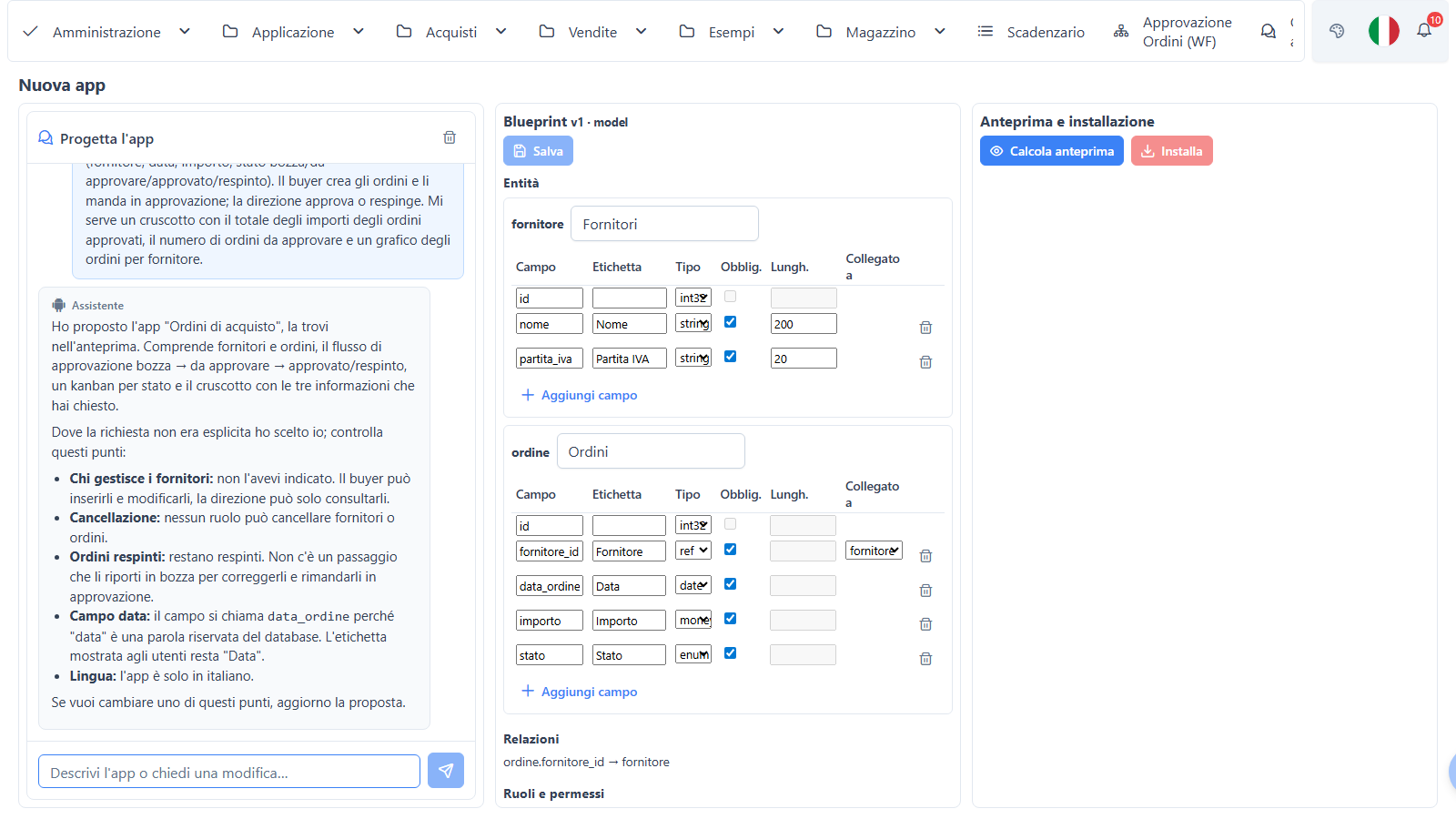
You describe the app; the model reads what it needs through read-only tools (what the compiler supports, the existing routes, the database catalog, the validator, a dry-run preview), asks at most a handful of structural questions, and proposes a blueprint. The central panel lets you edit it by hand — entities and fields, relations, the role/permission matrix, the menu — and every save is a new validated version that the model respects on the next turn. Turns run in the background with a notification when they're done.
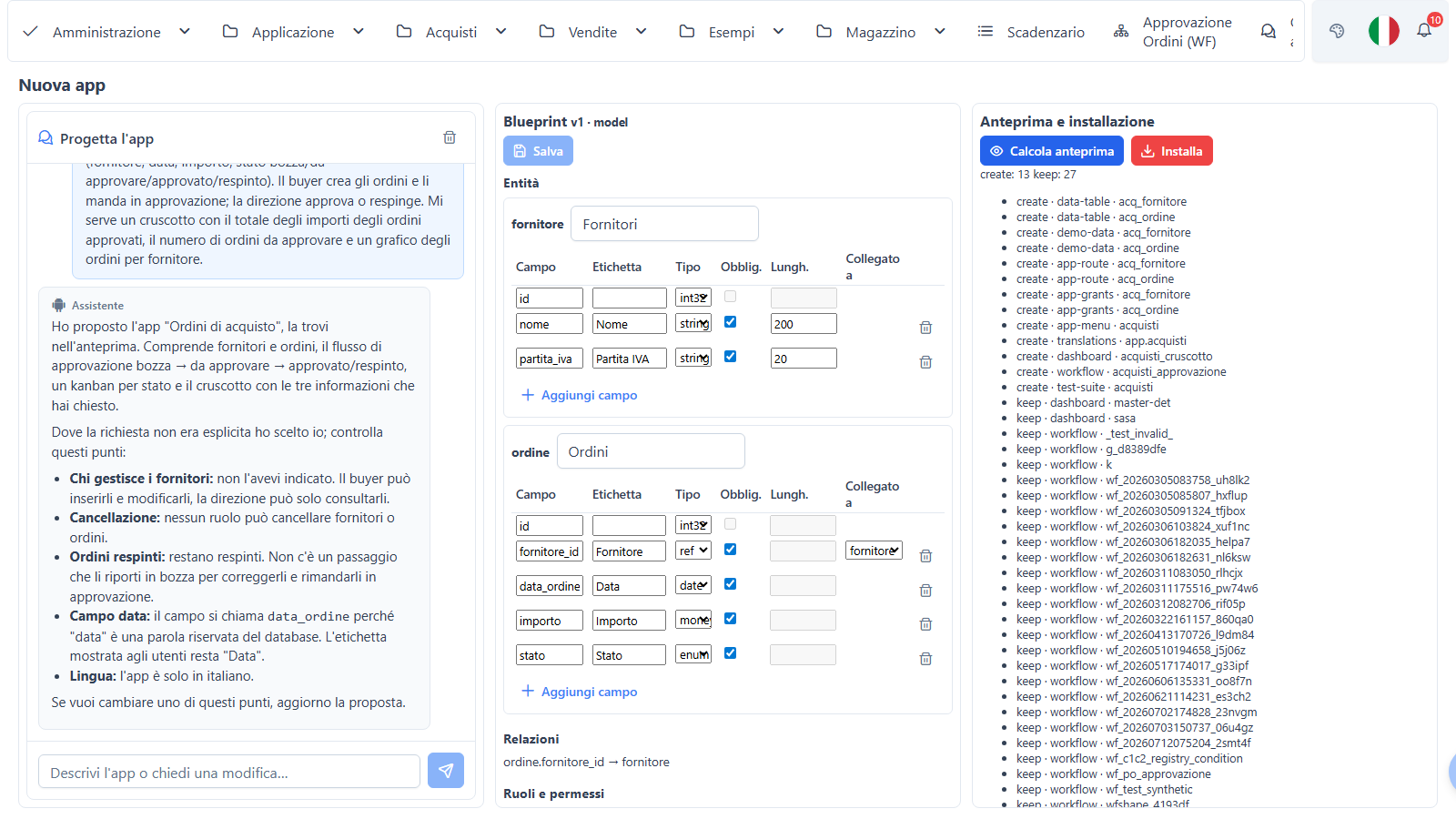
Install applies the plan. Afterwards the wizard links to the first menu entry, lists the custom-code hooks still to write, and offers Verify app, which runs the generated test suite.
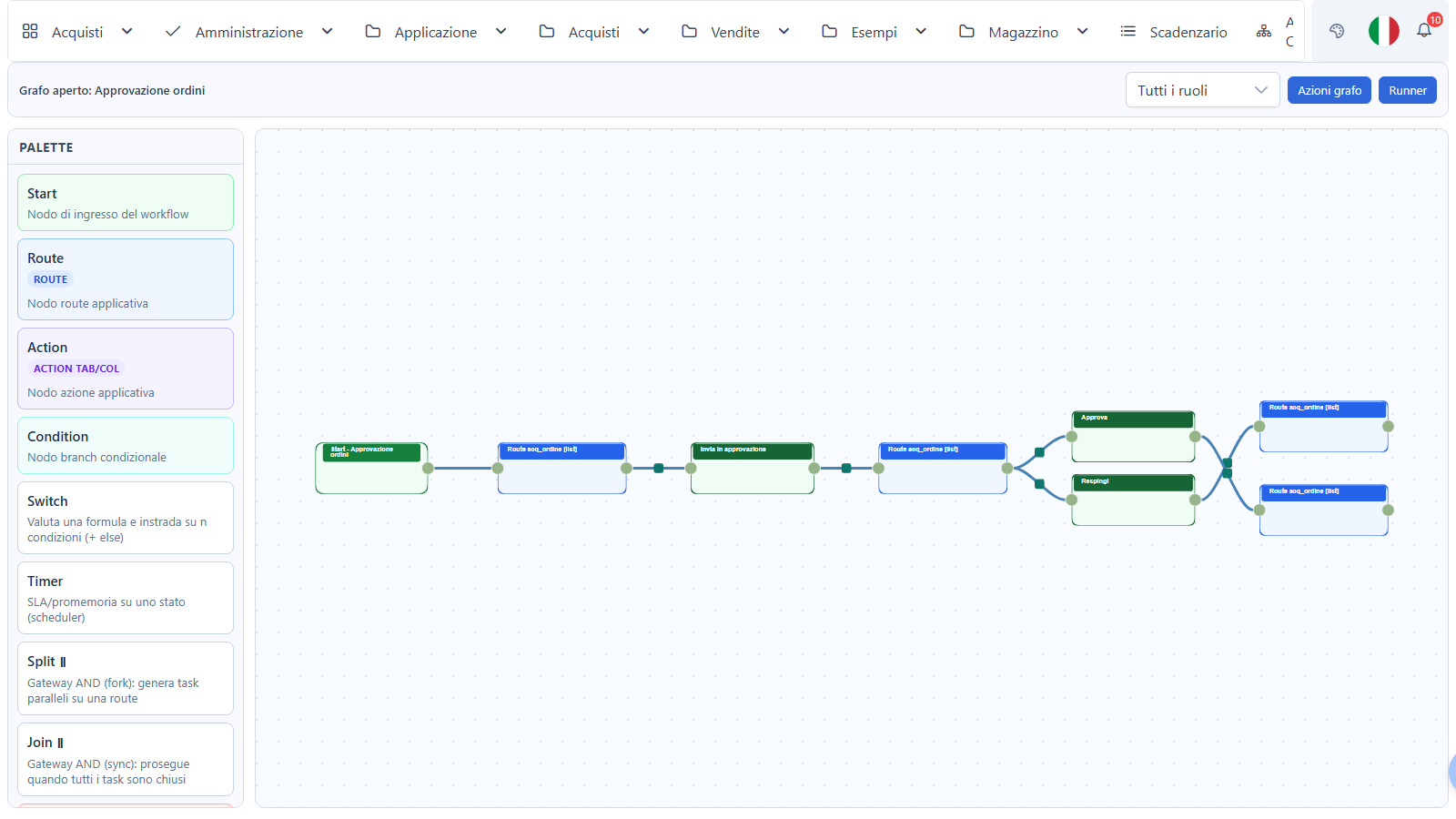
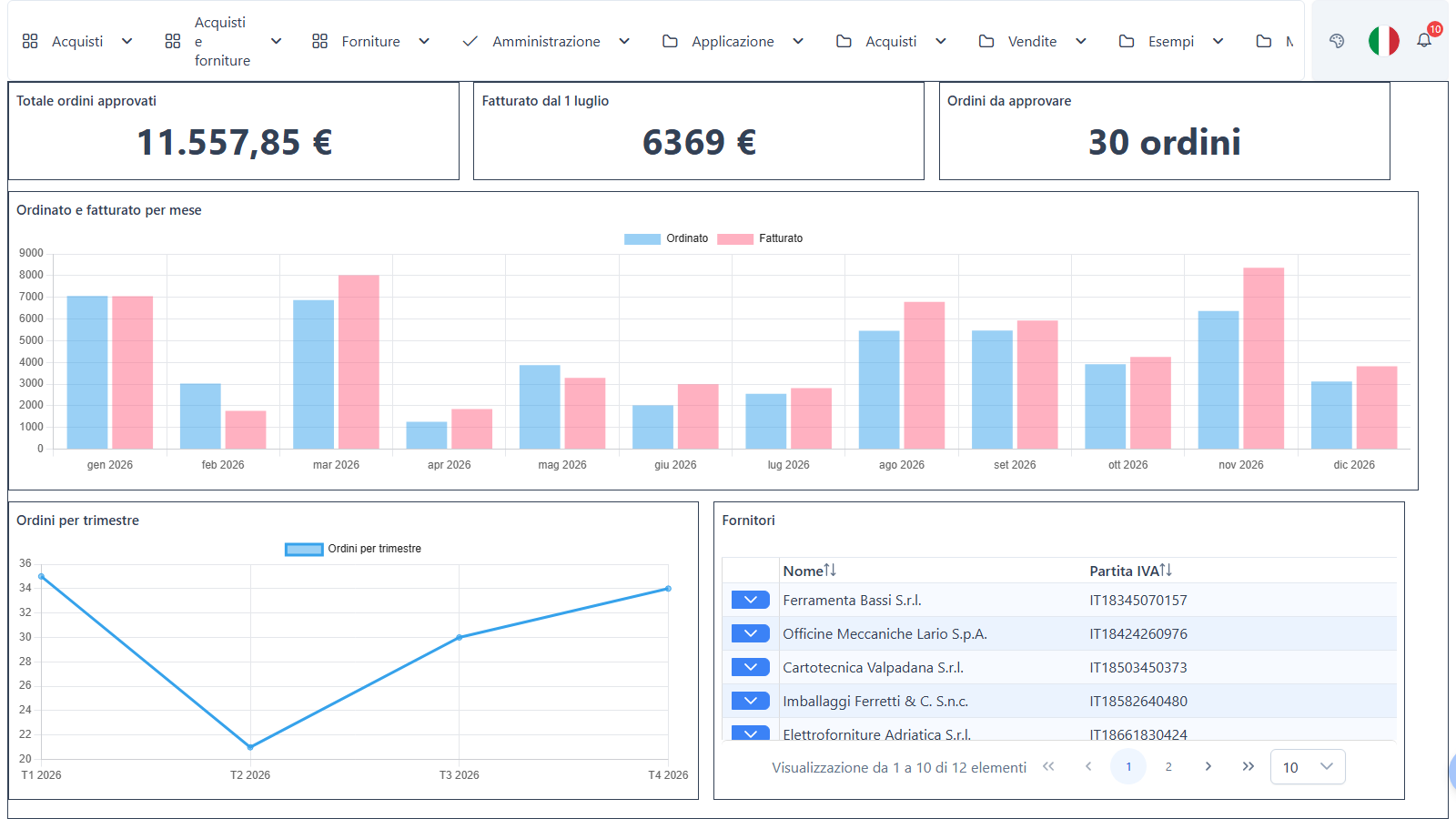
When the description asks for an overview or a cycle of states, the blueprint includes dashboards (KPI tiles with currency or unit formatting, bar/line/pie charts grouped by a field or by period, lists, laid out to fit the screen) and workflows (a state field, transitions with the roles allowed to run them, SLAs that notify a role or escalate the state). In a generated workflow the state only changes through its transitions — the server rejects direct edits of the state field.
The other two inputs
From an existing database ("adopt the tables"). Pick tables and views from the data database; the first blueprint is a deterministic draft, no model involved: foreign keys become references with a descriptive field, technical columns filled by the database are hidden, computed columns are read-only, menus are grouped by schema. Adopted tables are never changed — the package carries metadata only, the plan checks the tables exist, and new information about an adopted table goes into a new linked entity.
From Excel or CSV. Upload an .xlsx, .csv or .txt (up to 20 MB, 20 sheets, 200 columns, 100,000 rows per sheet) and get a profile: inferred types (Italian number and date formats included), unique columns, lookup candidates, relations between sheets. Each sheet becomes an entity, columns with few distinct values become reference tables, and after installation the rows are imported with references resolved to keys, duplicates skipped and rejected rows listed with the reason. By default the model sees the profile, not the cell values; sample values are sent only if you enable AppGenerator:SendSampleValues.
Changing an app that already exists
"Add the website to the teachers" starts a change session from the last installed blueprint — or, for an app the generator didn't create (a free app, something built by hand), from a reverse blueprint rebuilt from its routes, columns, lookups, permissions and menu. What the blueprint can't represent stays untouched and is listed as an override.
The installation is a three-way plan whose base is the last package installed for that app. Changes you made by hand in the designers stay, the requested ones arrive, and the same property changed on both sides is a conflict you resolve per property; installation is blocked until you do. A new field on an installed entity gets an ALTER on all four DBMSs; risky operations on the data DB — drops, narrowing a column, renames — are refused.
Tests that come with the app
Every generated app arrives with a test suite derived from its blueprint. The API-level suite checks, per entity and per role, metadata, permissions, a full CRUD cycle, validations (required fields, lengths, types, foreign keys, enums), row filters, reference data, menu, dashboard reads and every workflow transition — allowed or rejected — using temporary users and marked records it removes at the end. It refuses to run in a prod environment. Results land in the Verify app tab of the App lifecycle page, which can also build a suite for an existing app with Create the test suite for this app. A UI-level suite can be downloaded as one .mjs test per check (menu, grid, form with save and cleanup, kanban/calendar/chart), in the same docs-driven format we use for the framework's own end-to-end tests.
The point of the suite isn't to prove the generator right; it's to tell you, the minute an app is installed, whether it does what the blueprint says — and to keep telling you after you change it.
What we measured
The eval (23/10/2026, Claude Opus 5.5) has 33 cases: our free apps and ten domains described in plain language, two apps from a database, two from Excel/CSV, five requests beyond the limits, three injection attempts, and seven changes to generated or adopted apps. Every proposal was installed on throwaway SQL Server copies and run against its own suite.
| Metric | Result |
|---|---|
| valid proposals compiling in all four SQL dialects | 31/31 |
| installed and applied | 23/23 |
| expected entities found / relevant business entities | 100% / 98.5% |
| relations and field types | 100% / 100% |
| roles with more rights than described | 0 |
| executed injections or leaked secrets | 0 |
| correct changes and three-way comparisons | 5/7 |
| generated API suite green | 23/28 apps |
The red cells were the useful ones. Three of the failures were real defects — two in the generated suite (conditional fields on references, and a row-filtered role that may update but not insert), one in adding a reference field to an installed entity, which created the column without its foreign key and lookup — fixed the next day, each with a failing test first; re-running the affected cases brought the suites to 27/28 and the changes to 6/7. What's left is listed in the limits below. A typical app takes about one model turn (median 61 seconds) and costs around USD 0.30 at list prices. Two later runs focused on dashboards and workflows (eight cases in total) produced valid proposals with the expected tiles and graphs every time; seven of the eight installed with a green suite, and the eighth stopped on a suite defect with a rule tying a date to a state, since fixed (the suite now prepares records that honour state-bound rules).
What it does not do
- No custom code. Business logic that doesn't fit the blueprint — say, yearly progressive numbering — is listed as a
codeHooksbrief to complete with WUIC Assistant or Claude Code. The generator won't write C#. - No maps, and no
geo-point,file,imageor computed fields. - Row filters only in the form "this user field equals the current user".
- Dashboard filters are AND only, there's no filter the user can change on the board, and a chart computes one aggregate per field.
- A cross-field rule added to an entity that's already installed doesn't become a database CHECK — existing rows might violate it — so it stays an app-level validation, and the preview warns you.
- The reverse blueprint reads back only dashboards and workflows with the shape the generator produces; boards drawn by hand stay as they are.
- Suites for adopted tables have known gaps: composite unique keys aren't filled uniquely, and some suites on WideWorldImporters tables with period columns stay red.
- It needs a model: provider and key are those of the RAG chat (
rag-llm-provider,rag-llm-api-key, oragent-sdkwith theclaudeCLI), with per-turn, per-session and per-day token budgets.
On safety, the same rule as Ask your data: spreadsheet cells, table names and column comments are data, not instructions. The worst a malicious cell can do is influence a blueprint — which the validator checks and a superadmin reviews before anything is installed.
Trying it in 1.8.0
Log in as a superadmin, configure the RAG chat's model if you haven't, and open Administration → New app. Describe something small with two roles and a state ("a leave request app: employees request, managers approve or reject"), read the blueprint, change a field by hand, check the installation preview and install. Then run Verify app, and try a change in plain language to see the three-way plan. The full reference — blueprint schema, compiler output, Excel limits, API and configuration — is in the app generator docs.