A metadata-driven framework has an awkward secret: the app is the database. Routes, columns, menus, permissions, translations, dashboards, workflows, report definitions — in WUIC all of that is rows in the metadata DB, edited from designers in the browser. That's what makes changes fast. It's also what made two questions hard to answer until now: who changed this, and what was it before? and how do I move what we built in dev to production?
Before 1.8.0 the honest answers were "check the audit columns and hope" and "backup and restore, or a hand-written script". There was no per-artifact history — the only "version" was a counter used to invalidate caches — and every save overwrote the whole artifact. Moving an app meant a SQL Server .bak or idempotent scripts that looked IDs up by name. It worked, but it doesn't scale past one developer and one environment.
WUIC 1.8.0 adds the metadata lifecycle: history, comparison, releases, packages and promotion between environments, from the page Administration → App lifecycle or from a command-line client for pipelines.
Artifacts, canonical form, hashes
The unit of versioning is an artifact. A route artifact bundles the _metadati__tabelle row with its columns, styles, actions, conditions and nested grid links into one JSON document. The other types follow the shape of an app: route-grants, menu, translations, theme, scheduler-job, mailing-template, webhooks, dashboard, pivot, workflow, report, scene3d and a few more.
Each artifact is stored in a canonical form designed to be identical across environments: DBMS-neutral JSON with sorted keys; local numeric ids replaced by symbolic references ({"$ref":"route","key":"customers"}, roles by name); environment values replaced by bindings (${conn:...}, ${secret:...}); derived data removed. Its SHA-256 is the artifact's version. Two environments with the same hash have the same content, so comparing environments is a hash comparison, not a row-by-row diff.
Just as important is what stays out. Users, companies, connection strings and secrets are environment data and never enter a package. Logs, workflow instances, notifications and chat are runtime and excluded. Workflow transitions, SLA jobs and pivot refresh jobs are derived and regenerated in the target. Framework system rows are the framework's business (more on that below). Business data in the data DB never goes into versioning at all.
History you don't have to remember to record
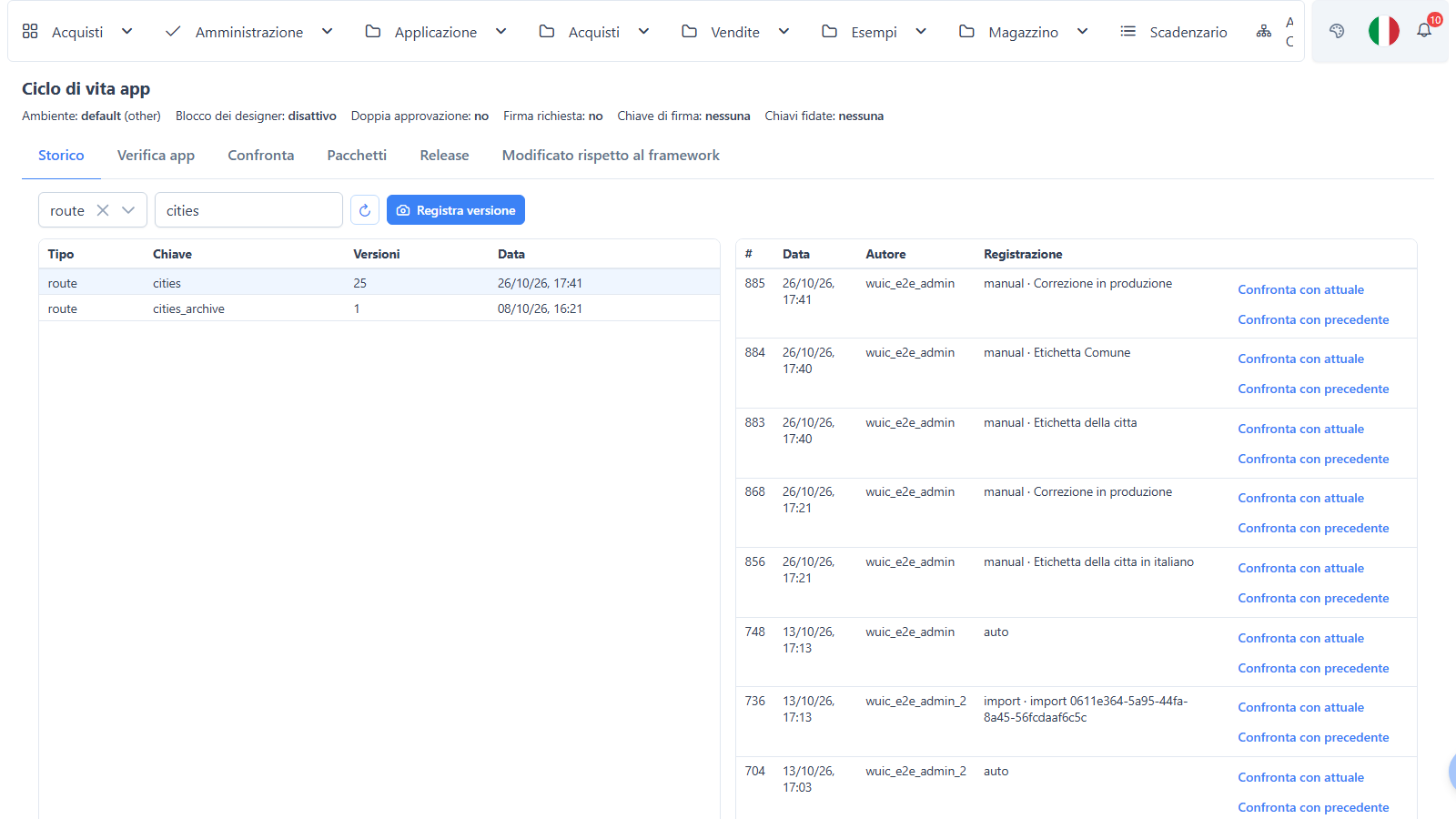
Every metadata save — from a designer or from the metadata CRUD — flags the artifact; a built-in job running every minute exports flagged artifacts and records a version only if the hash actually changed. Once a day a reconciliation pass also catches changes made outside the APIs (yes, direct SQL), so the history doesn't depend on everyone using the UI.
The designers have a History / Compare button: workflow designer, dashboard designer, pivot builder, theme builder and the metadata editor. Comparison uses a side-by-side diff with the list of changed properties; workflows and dashboards also get a visual diff, with nodes and links coloured by status. Designer noise — the x/y position of a workflow node you nudged, a couple of designer-internal properties of dashboards — doesn't count as a change, because a history full of "moved a box 3 pixels" is a history nobody reads.
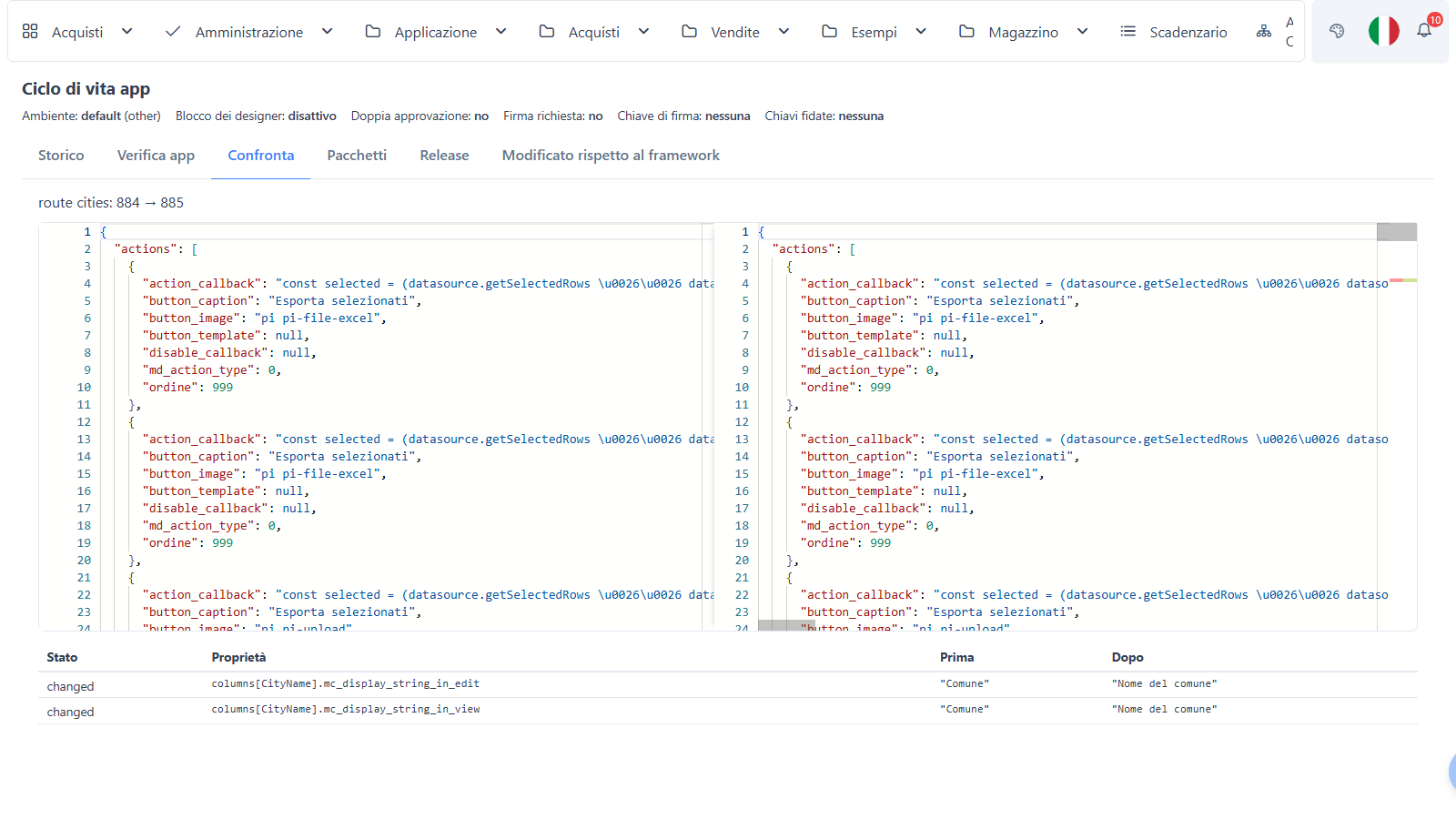
Going back is never a blind overwrite. Restore this version builds a three-way plan: if the artifact changed again later on the same properties, you see the conflict and choose. You can also shelve a version — put the artifact back where it was, keep the shelved version in the list — and reapply it later, again through a plan.
Releases and packages
A release is a named picture of the app: the frozen uid → hash manifest of every artifact, plus a changelog of what's new, changed and removed since the previous one. The New release dialog previews the changes and lets you exclude artifacts that aren't ready — an excluded artifact keeps the hash it had in the previous release, so half-done work doesn't get promoted.
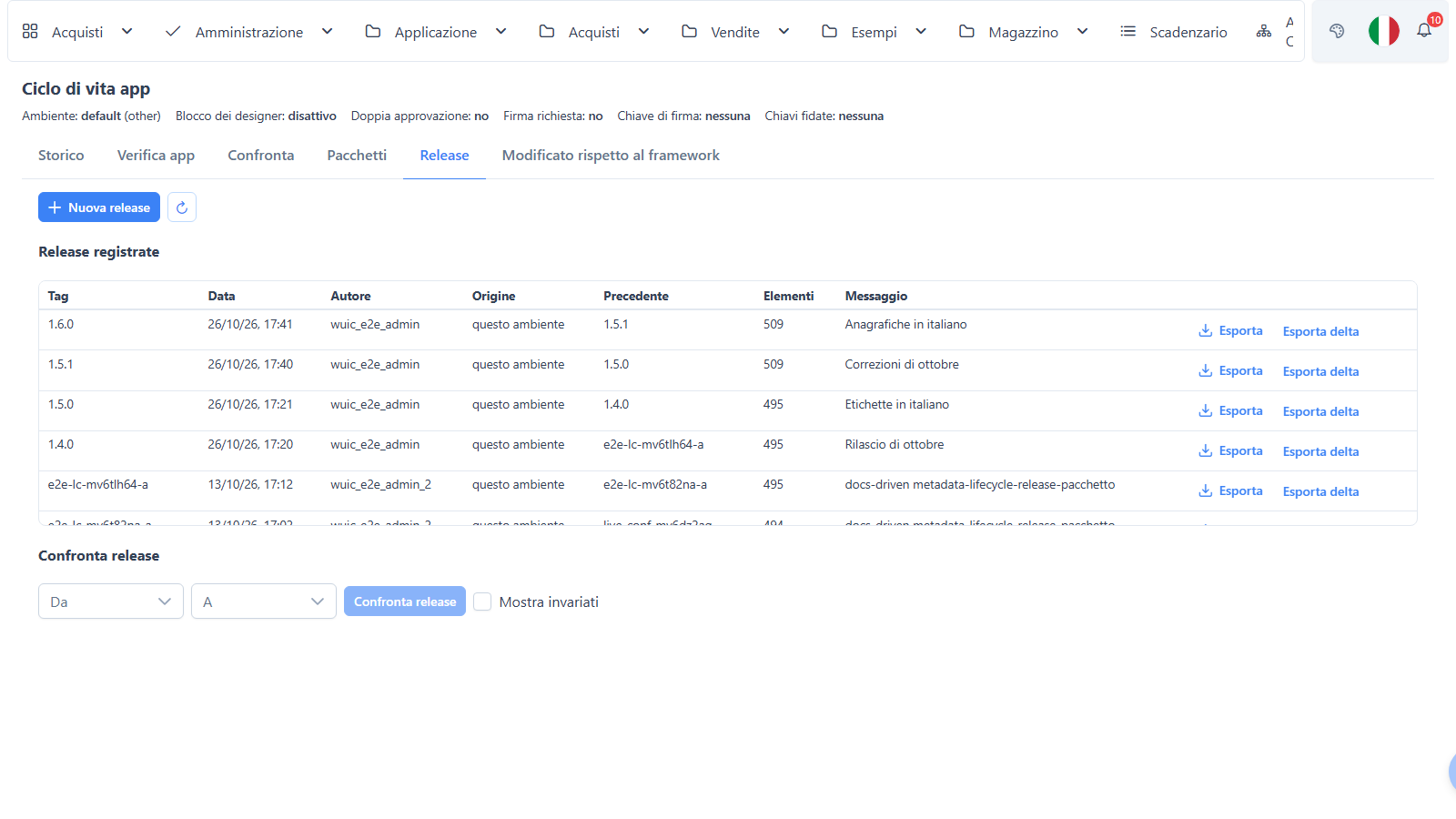
A release exports to a .wuicpkg package: a ZIP with a manifest.json (SHA-256 of every file, source environment, minimum framework version, notes), the artifacts in canonical form and the attached files (.mrt reports without connections, CSS, 3D assets). Packages can be full (works on any target), delta (only what changed between two releases, valid only on a target sitting exactly at the base release) or single (one version, used by restore). With a signing key configured, the manifest is signed with RSA-PSS, and the target classifies the package as trusted, untrusted, unsigned or invalid.
Promotion: a plan first, always
Importing a package is always a dry run first. For each artifact the plan compares three hashes: the base (the target release known to the source), the source (the package) and the target (the installation as it is now).
| Situation | Plan |
|---|---|
| source = target | skip |
| changed only in the source | update |
| changed only in the target (a hotfix in prod) | keep, with a warning |
| changed on both sides | automatic per-property merge; where they really differ, a conflict |
| missing in the target | create |
| only in the target | delete, only if you ask for prune |
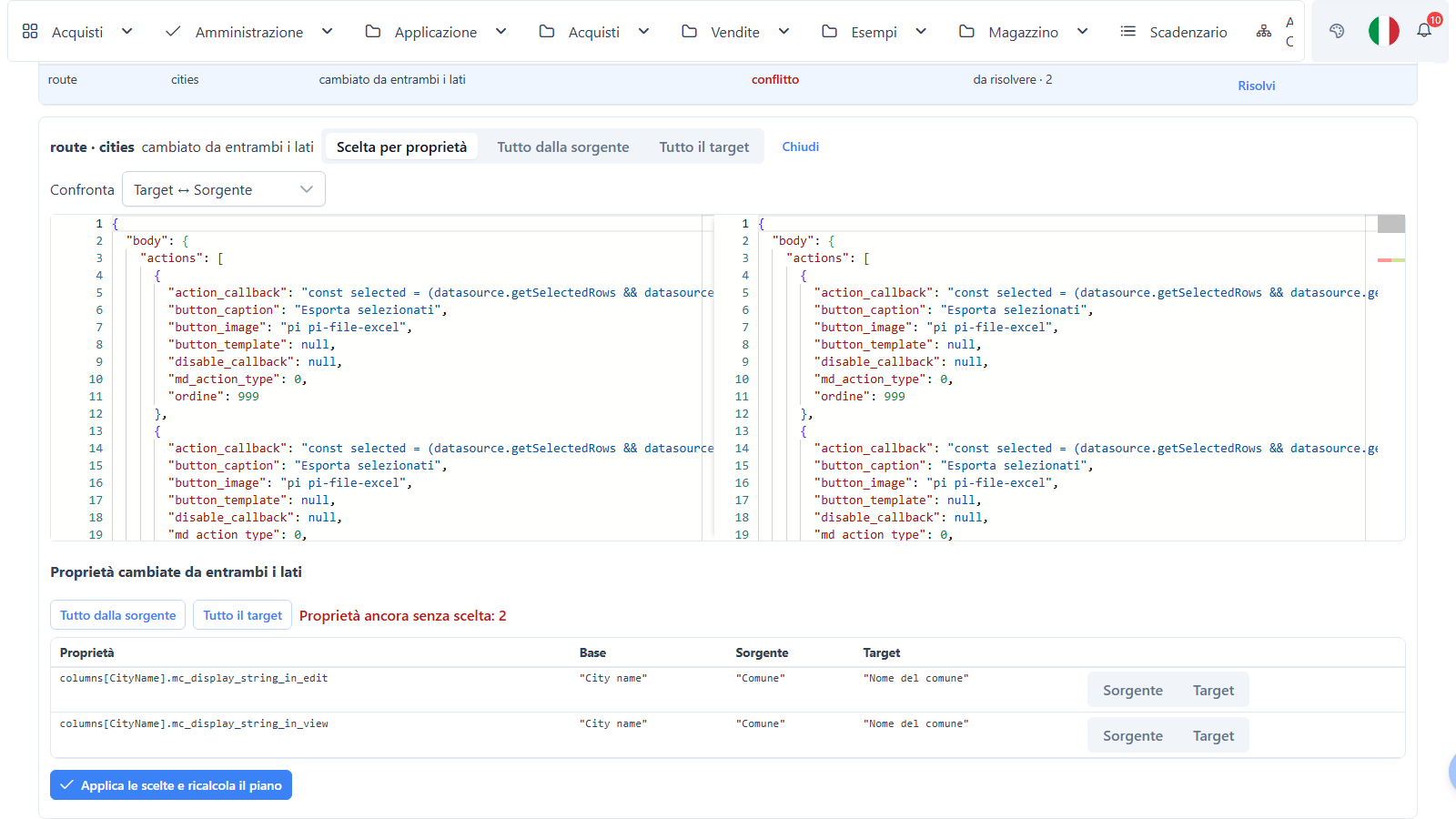
Conflicts are resolved per artifact or per property; every choice recomputes the plan and its hash, and Apply is refused while any conflict is open. Apply takes a snapshot, runs in one transaction on the metadata DB, regenerates derived data, invalidates caches and records an import commit. Then it verifies: the imported artifacts are re-exported and their hashes compared with the package. If the apply fails halfway or the verification doesn't match, the metadata go back to the snapshot automatically. And if it succeeded but you change your mind, Roll back on the promotion restores the snapshot.
For production there are three switches in appsettings.json under MetaLifecycle, with defaults that depend on the environment role: a design lock (warn shows a banner in the designers and is the default in prod; on blocks design saves, so only lifecycle apply and rollback change metadata), a second approver (whoever planned the promotion can't apply it) and required signatures (unsigned or untrusted packages are rejected), the last two active by default only in prod. Every plan, resolution, apply and rollback is audited with user, IP, hash and signature.
The same thing from a pipeline
scripts/wuic-meta.ps1 (PowerShell 7) calls the same APIs with a personal token that has the meta-lifecycle scope:
$env:WUIC_META_URL = 'https://dev.example.com'; $env:WUIC_META_TOKEN = '<dev token>'
pwsh -File scripts/wuic-meta.ps1 release-create --tag 1.4.0 --message "sprint 12"
pwsh -File scripts/wuic-meta.ps1 export --tag 1.4.0 --out release-1.4.0.wuicpkg

$env:WUIC_META_URL = 'https://prod.example.com'; $env:WUIC_META_TOKEN = '<planner token>'
pwsh -File scripts/wuic-meta.ps1 plan --package release-1.4.0.wuicpkg --json > plan.json
pwsh -File scripts/wuic-meta.ps1 apply --promotion <id> --plan-hash <hash>
Exit codes are meant for CI: 0 ok, 2 open conflicts, 3 rejected (permissions, design lock, outdated plan), 1 error. A pipeline can plan automatically and stop on 2 for a human to resolve.
When the framework itself changes
There's a second kind of upgrade: the framework ships its own system rows (system routes, menus, permissions) and a new version changes some of them — possibly rows you customized. Each framework version now embeds its system baseline, and at startup it runs the same three-way logic row by row: rows you didn't touch are updated, your customizations are left alone, and real conflicts are left as they are and listed in the Changed from the framework tab, where you pick Keep mine, Take the framework or a column-by-column merge. The first realignment after upgrading to 1.8.0 overwrites nothing; it only inserts missing rows. The Updates tab tells you, read-only, whether a newer framework (or free app) version is available — nothing is installed from the browser.
A real case: upgrading the free apps from 1.7.28 to 1.8.0
The first users of all this are our own free apps. A customer who installed FatturazioneElettronica, CrmApp or FlottaMezzi 1.7.28 has probably changed something — a label, a dictionary, a report. Shipping 1.8.0 as a new .bak would have wiped that out. Instead, the 1.8.0 zip has an upgrade\ folder with two metadata packages: the 1.7.28 metadata exactly as we published them (the base) and the 1.8.0 ones (the source). The customer's installation is the target.
The procedure in the free app upgrade guide goes like this: back up the two databases and the application folder, replace the program files keeping appsettings.json, run the data DB scripts with Upgrade-Database.ps1, restart. Then, in Administration → App lifecycle → Packages:
- upload the 1.7.28 package and apply it, keeping everything in the target — this changes nothing, it just registers the base release that 1.7.28 never recorded;
- upload the 1.8.0 package and compute the plan, checking that the Base release is the 1.7.28 one;
- resolve the conflicts — the places where both the customer and we changed the same thing — and Apply.
A concrete example: if you'd relabelled the dictionary of the stato_sdi column in fatture_inviate, and 1.8.0 changes that column too, the conflict is on that one property. With the per-property choice you keep your labels and take the rest of the new route. A report you changed and we didn't isn't even in the conflict list. If the result isn't right, Roll back on the promotion brings the metadata back to before the apply (program and data DB stay at 1.8.0); the backups from the first step take everything back to 1.7.28.
The limits
- Same DBMS only. Promotion between, say, SQL Server and PostgreSQL isn't supported: free SQL inside metadata isn't translated. Within each DBMS, history, packages, plan, apply and rollback are verified on all four (SQL Server, MySQL, PostgreSQL, Oracle).
- The data DB is not covered. Schema, migrations and reference data of existing apps travel separately — which is exactly why the free app upgrade has its own data scripts. Packages carry data DB tables only for apps created by the app generator.
- Files, not push. Transport is the
.wuicpkgfile plus the CLI; there's no direct environment-to-environment push. - Superadmin only, checked against the database. With multi-tenant, history and promotions are per tenant, but installation files (reports, CSS, assets) are shared across tenants.
Trying it in 1.8.0
Log in as a superadmin (the administrator created by the first-run wizard is one), change a column label in a route, wait a minute and open Administration → App lifecycle → History: the new version is there with your name. Compare it with the previous one, restore it, then create a release and export it. If you have a second installation, upload the package there and read the plan before applying it — that's the whole point. The complete reference, including every API under api/meta-lifecycle/*, is in the metadata lifecycle docs.